- Topic ID: id_23554200
- Version: 2.0
- Date: Sep 26, 2020 10:14:35 PM
Touch Sensor L Assy Replacement
Prerequisites
Overview
Procedure
- Raise the Table to maximum height.
- Move the Cradle and IMS to OUT limit position.
- Remove power from Table by turning off 120VAC, Axial Drive and HVDC switches on Service Switch Panel.
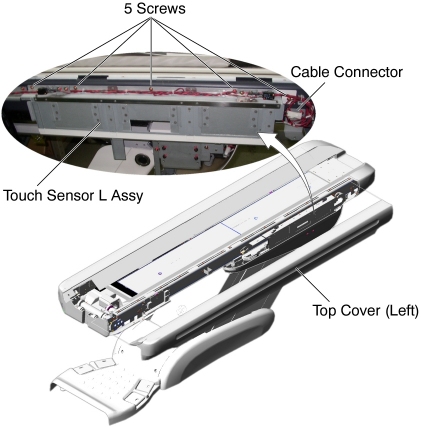
- Remove the Top Cover (Left).
- Cut any tie-wraps, and disconnect the cable connector.
- Unscrew 5 screws, and remove the Touch Sensor L Assy from the
Table.
Figure 1. Touch Sensor L Assy
- Install the New Touch Sensor L Assy into place, and tighten the 5 screws.
- Connect the cable connector.
- Adjust the sensor position by two set screws (Refer to Side Touch Sensor Positioning).
Finalization
- Power up the Table from the Service Switch Panel.
- Verify that the Touch Sensor L function is operating normally.
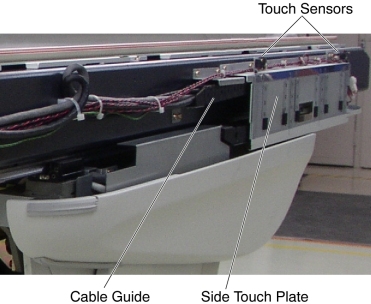
- Move the IMS In/Out and Table Up/Down, and check the touch sensors
on the left side visually to make sure that the sensors are not activated
by hitting the cable guide against the side touch plate.
Figure 2. Side Touch Plate and Cable Guide
- Turn off all 3 switches (Axial Drive, HVDC, 120VAC), and re-install the Table covers.
- Push up the side touch plate, and verify that the touch sensor is activated without being hidden behind the Table top cover (Refer to Side Touch Sensor Positioning).