- Topic ID: id_23554401
- Version: 1.0
- Date: Oct 9, 2018 1:43:38 PM
System Calibration Process
Prerequisites
Overview
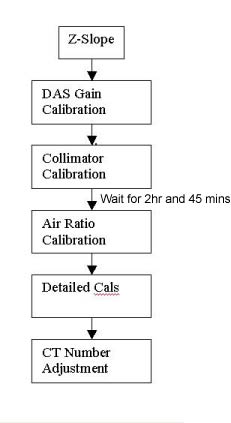
The standard RT16 calibration process is to run calibrations or adjustment in sequence of the below flowchart.
Figure 1. Calibration Process (Flowchart)
Procedure
- Bring up the main menu: It is represented as an icon located
on the bottom of the screen labeled as SCANNER UTILITIES. Click the on-screen Scanner Utilities button.
Figure 2. Scanner Utilities Main Menu
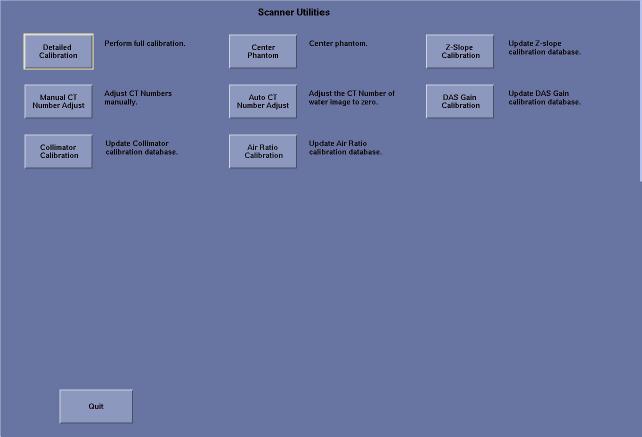
- The Main menu consists of the following button selections:
-
Collimator Calibration - Runs the collimator calibration tool.
-
Detailed Calibration - Brings up the Detailed Calibration screen.
-
Center Phantom - Runs the phantom centering utility.
-
Auto CT Number Adjust – Runs the CT number adjust tool. For use during the calibration
-
Manual CT Number adjust - Runs the CT number adjust tool. For Customer use or CT # touch-up.
-
Air Ratio Calibration – Run air ratio cal.
-
DAS Gain Calibration – Run DAS gain calibration
-
Z-Slope – Update Z-slope calibration database
-
Quit - Exits the application
-
- Click on the buttons following the process.
Finalization
No finalization steps.