- Topic ID: id_15460451
- Version: 3.0
- Date: Apr 22, 2019 12:56:27 AM
Stationary Base Cover Removal and Reinstall
Prerequisites
Overview
This procedure defines the steps to remove and reinstall the gantry base covers.
Procedure
-
Figure 1 shows the gantry base covers. There are two side covers, two rear
covers and a single front cover.
Figure 1. Gantry Base Covers
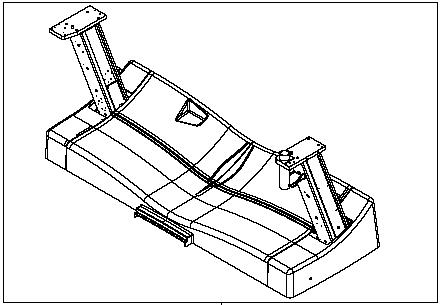
Figure 2. shows the interconnections of the base covers. Follow the subsequent steps to remove the gantry base covers.
Figure 2. Bottom cover
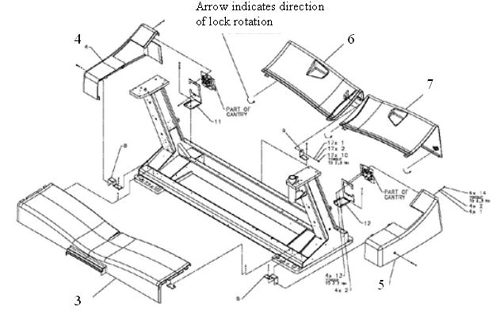
- Start with the rear covers (Shown as items 6 and 7). Using an 8 mm hex wrench twist the 3 twist locks counter-clockwise to release the locks and pull each cover out from the back of the gantry.
- Remove the side covers (shown as items 4 and 5) if needed by
removing the one screw on the side (3 mm hex wrench) and 2 screws
the interface panel (2.5 mm hex wrench) on the back side of the gantry,
then slide the side cover away from the gantry to the side.note:
The side covers slide around the Interface Panels. No need to remove cabling or move the interface panels.
- Remove the base front cover (shown as item 3) if necessary by removing two screws on each end holding the cover mount bracket to the gantry base rail to release the cover from the brackets. Lift the cover up and over the foot switch cover and away from the gantry.
- To reinstall the gantry base covers, reverse the above steps, putting on the covers in the order of front, sides then rear covers.
Finalization
No finalization steps.