- Topic ID: id_15460373
- Version: 3.0
- Date: Apr 9, 2020 8:50:03 PM
Slipring HV Capacitor Replacement
Prerequisites
Overview
Procedure
- Shutdown system software in preparation to shutdown the system.
- Remove the right side cover and power down the gantry.
- Power down the entire system per LOTO procedures and wait 5 minutes to remove capacitive power.
- Remove the top and rear gantry covers.
- Remove the slipring safety cover that is over top of the HV connections for easier access to the HV terminals.
- Remove the damaged capacitor by removing the plastic shield,
tywrap and screws as shown in Figure 1 and Figure 2.
Figure 1. Capacitor removal part 1
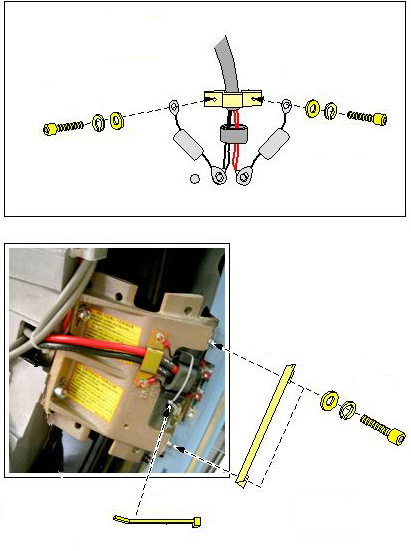
Figure 2. Capacitor removal part 2
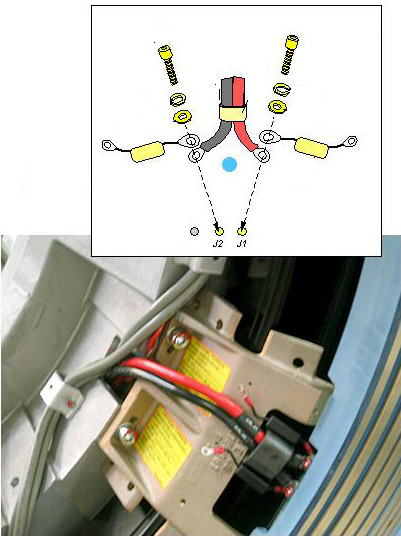
- Install the new capacitor per the order below using Figure 2 and Figure 1 as a reference.
-
Install the capacitor per the above illustrations.
-
Install a ty-wrap around the two capacitors and HV cable ferite as shown in Figure 1.
-
- Torque all screws to:
- Install the plastic shield as shown in Figure 1. Torque the screws to the values shown in Table 6.
- Reinstall the slipring safety cover.
- Reinstall the gantry covers.
- Power on the gantry per standard procedures, wait for the detector to come up to operating temperature.
Finalization
- Perform any retests necessary as applicable to the failure mode originally seen.
- Perform a generic service scan with the QA phantom to look for any artifacts.