- Topic ID: id_18480587
- Version: 3.0
- Date: Jan 20, 2020 8:32:25 PM
Fan Harness Assembly Replacement
Prerequisites
Overview
1 Removal Procedure
Procedure
- Select one of the following methods to Power OFF the Operator
Console:
- If Applications are up, click on the Shut Down button and select Shutdown.
The Operator Console monitor will display a 'Power Down' message when it is acceptable to power OFF the Operator Console.
- If Applications are down, open a Unix Shell. Type: halt.
- If Applications are up, click on the Shut Down button and select Shutdown.
- Power OFF the console at the front panel switch.
- Remove the top cover.
Refer to
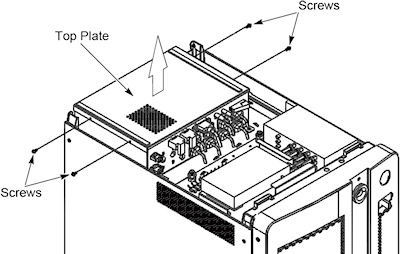
- Remove four screws on the top panel of AC Box Assembly, and
remove the top panel.
Figure 1. Top Panel of AC Box Assembly Removal
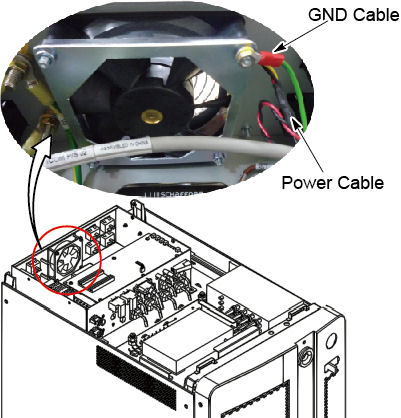
- Disconnect a power cable and a GND cable form fan harness.
Figure 2. Power Cable and GND Cable
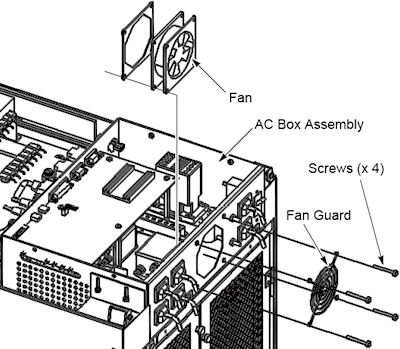
- Remove four screws that hold the fan to the AC box Assembly,
and remove the fan.
Figure 3. Fan Removal
2 Installation Procedure
Procedure
- Install a new fan using the four screws and fan guard.
- Re-Connect the power cable and GND cable to the fan.
- Power ON the Operator Console at the console front panel switch.
- Verify that the fan is blowing air in the proper direction.
3 Finalization
Procedure
- Power OFF the console at the front panel switch.
- Re-Install the top panel of the AC box assembly.
- Re-Install the console cover.