- Topic ID: id_23554324
- Version: 2.0
- Date: Feb 4, 2020 1:38:46 AM
Change Tube (New Tube) Program
Prerequisites
Overview
New Tube prepares the system to store tube usage statistics, for trend analysis, and tube warranty purposes.
Procedure
- Select REPLACEMENT.
- Select TUBECHANGE.
- Select CHANGETUBE.
- Refer to the list in Table 3,
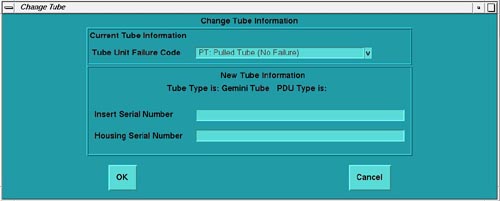
and type/enter the failure code for the defective tube in the “Tube
Unit Failure Code” field on the screen.
failcode ENTER
- Refer to the Tube Housing; type/enter the new Tube’s Insert Serial
Number in the appropriate field on the screen.
Insert Serial Number
- Refer to the Tube Housing; type/enter the new Tube’s Housing Serial
Number in the appropriate field on the screen.
Housing Serial Number
- Click OK to accept these changes (see Figure 1).
Figure 1. Change Tube Screen
Finalization
No finalization steps.