- Topic ID: id_16158000
- Version: 3.0
- Date: Apr 9, 2020 8:41:11 PM
Cardiac Monitor (IVY 3150–B) Installation
Prerequisites
Overview
This procedure applies to CT systems with the Integrated Peripheral Controller (IPC) board.
1 IVY 3150 (B) Cardiac Monitor Installation
Contents of the Cardiac Monitor collector are shown in Table 2.
Procedure
- Setup/assemble the Cardiac Monitor cart. (Refer to assembly manual.)
- Attach the Cardiac Monitor to the cart.
- Refer to Figure 1 for the remaining steps in this section.
Figure 1. IVY 3150-B Cardiac Monitor
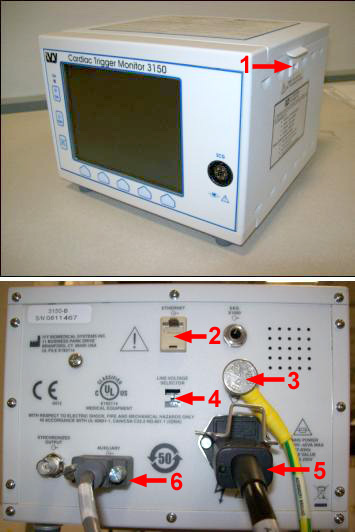
- Verify Voltage Line Select switch is set to 115V.
- (For systems with IPC only) Attach Ground cable to Ground Lug at rear of Cardiac Monitor.
- (For systems with IPC only) Attach Ground cable to Ground Lug on the IPC Panel.
- Connect AC (IEC) power cable to the back of the Cardiac Monitor.
- Connect the AC (IEC) power cable to the Power connector (IEC) at the Gantry Options Panel (IPC).
- Connect signal cable 5193969-5 and 5314085 according to Table 3.
2 Enabling the IVY Cardiac Monitor
Procedure
- At the console select:
- Common Service Desktop.
- Configuration tab.
- Install Gating Monitor.
- From the menu select:
- IVY3150.
-
Accept.note:
This automatically sets up the monitor at IP address 10.44.22.21.
3 Finalization
No finalization steps.