Using Rotational Locks for Mechanical LOTO for the Gantry
warning
Biological Hazard
Bodily fluids, sharps, and medical waste from patients are present. Do not place hands or fingers under the gantry, base of the table, or foot pedal assembly.
Follow all of your organization’s bloodborne pathogen procedures and policies as well as any local policies, laws, and regulations.
caution
Pinch Hazard
Failure to keep fingers and hands away from pinch points may result in personal injury.
Be careful when moving, removing, or installing heavy components (or components in tight spaces).
caution
Mechanical Edge Hazard
With the covers removed, sheet metal edges are exposed. Avoid forceful contact with abrasive edges.
notice
PPE Required
Follow ALL required safety and PPE procedures customary for your organization when working on this product.
Follow these general rules:
Only qualified service personnel trained in the service and operation of this scanner, options, and accessories should perform any service on this equipment. Service personnel must observe and apply LOTO as defined by annual LOTO training.
1 Gantry Mechanical LOTO
When the system is powered up, the axial drive controls the rotating assembly; however, when the gantry is powered off, the rotating assembly is free to rotate. The rotating assembly is a tightly balanced set of components. Removal of any item will cause the rotating assembly to suddenly turn. Use a rotational service lock and a labeled index position to prevent rotation and provide service access.
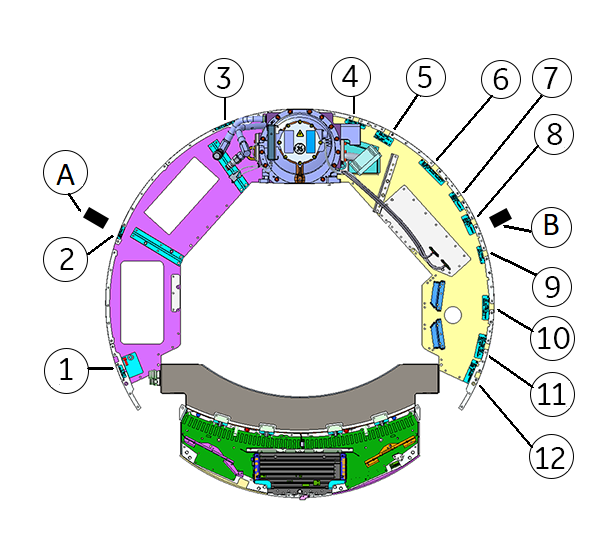
Rotational Service Lock A (front left) or Rotational Service Lock B (front right) slide into labeled index positions. These locks have a safety cover that allows the latch to be locked out using the LOTO lock.
Figure 1. Rotational service locks and index positions
2 Applying rotational service lock LOTO
Bring the system software down at the Scanner Desktop.
After shutdown is complete, power down the gantry by turning off [Axial Motion], [Rotating Power], [HVDC] and [120VAC] service switches on GCB Front Panel (GFP).
note: Some service procedures require gantry power. Follow the specific LOTO instructions provided for those service events.
Open the front covers or remove any covers necessary for service access.
Manually rotate the gantry to the desired location.
Align either rotational service lock with a labeled index position.
note: Use a rotational service lock and a matching labeled index position to provide the best service access.
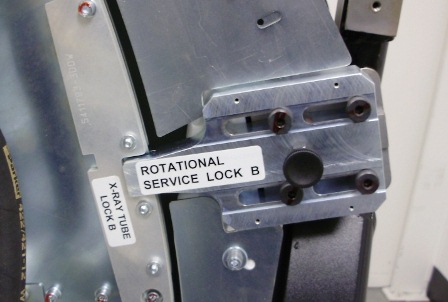
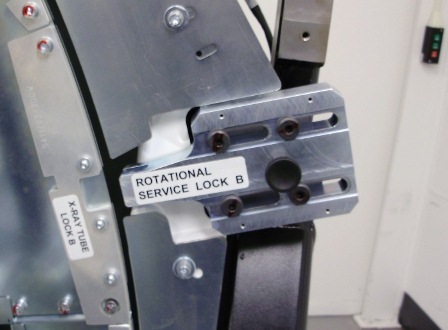
Engage a rotational service lock by pulling out the spring-loaded bolt in the middle and then sliding the rotational service lock into the engaged position.
Figure 2. Rotational Service Lock engaged
Figure 3. Rotational Service Lock disengaged
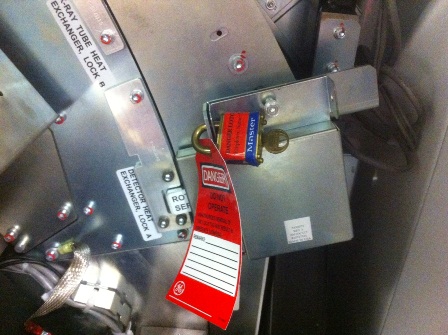
Flip the cover over the Rotational Service Lock and apply personal LOTO device and tag.
Figure 4. Rotational Service Lock LOTO
Reverse the steps above to remove the gantry mechanical LOTO.