- Topic ID: id_11038883
- Version: 4.0
- Date: Apr 22, 2019 12:56:40 AM
FLASH Download
1 Overview
This utility loads the FLASH memory located on the system control processors (nodes) with files stored on the system disk. This allows the nodes to initialize quickly after a reset is performed. This utility can also be used to check the nodes for the correct file versions without forcing a download.
This tool must be used at least once after upgrading software or replacing any CCB, DCB, STC, ETC, TCB, OBC, ORP, SCORP, TGP, TGPU, JEDI/PPC, or JEDI tank board. The tool must also be used if an Attention window displays or an error message is logged indicating that a file version mismatch was found.
Not all systems contain each of the mentioned control boards. The boards used will vary by system type.
2 Procedure
Flash Download can be performed by one person in 30 minutes time.
-
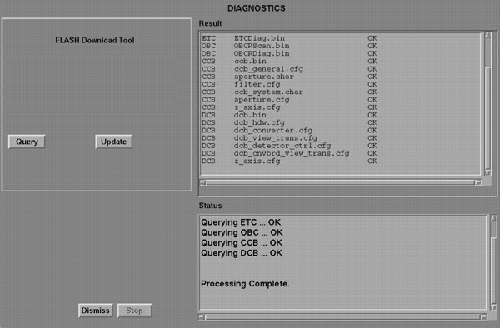
Launch the FLASH DOWNLOAD TOOL from the UTILITIES tab of the Common Service Desktop. Refer to Figure 1 for a description of the tool interface.
Figure 1. FLASH Download GUI
-
Click the Update button. Verify that all files are downloaded without errors.
note:The FLASH Download Tool may need to be run several times to successfully FLASH all control boards.
3 Additional Information
-
The OBC/ORP/SCORP must be downloaded to FLASH the CCB or DCB.
-
The aperture.char file is unique for each collimator. The numeric part of the serial number must be entered for this file to determine if an upload or download is required.