- Topic ID: id_18480195
- Version: 3.0
- Date: Apr 22, 2019 12:55:46 AM
Xtream Display Japanese Character Setting
Prerequisites
Overview
The Xtream Display can display a patient name in Japanese if patient data is sent in desired format from RIS server. This procedure describes how to use that functionality.
Limitations:
-
Only supports patient names from the RIS.
-
Only supports the double-byte character (ISO 2022 IR 87). Half-width character such as ISO 2022 IR 13 is not supported.
-
Japanese characters are not displayed on console.
-
Japanese characters are not stored in image data. Only English characters will be stored in image data as ISO_IR 100.
1 Patient Data Requirements to RIS Server
The RIS server needs to send the patient data to CT in the following format.
Procedure
- (0008,0005) Specific Character Set shall be set as “\ISO 2022 IR 87” (Japanese Character Set)
- (0010,0010) Patient Name shall be described as below.
Roman alphabet=Kanji=Hiragana (or Katakana)
Kanji and Hiragana (Katakana) can be omitted, but leave the “=”.
Example:
 note:
note:Some RIS server does not send Japanese Patient name to CT if “ISO_IR 100” (latin1) is used in (0008,0005) in C-FIND request. The “ISO_IR 100” is a default value set in (0008,0005) in CT. In that case, change the MWLCharSet in /usr/g/config/Dicom.cfg to “\ISO 2022 IR 87”.
2 Patient Data Processing Flow
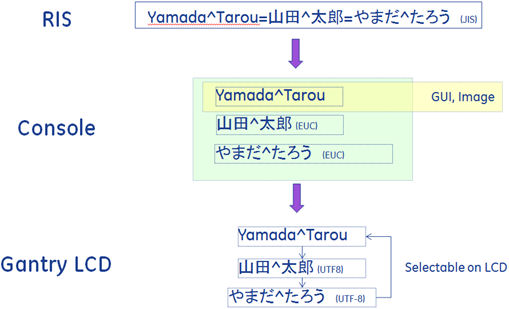
3 Finalization
No finalization steps.