- Topic ID: id_11038810
- Version: 4.0
- Date: Mar 6, 2020 9:57:50 PM
Table Covers Removal
Prerequisites
1 Bottom Cover
Procedure
- notice
- Move the cradle OUT to its fully retracted position (farthest from Gantry).
- Raise the Table to its highest position.note:
If the Table up/down movement is inoperative, use the service power cable to raise the Table (refer to Enforced Table Elevation).
- Remove power from Table by turning off “120VAC”, “Axial Drive” and “HVDC” switches on the service switch panel.
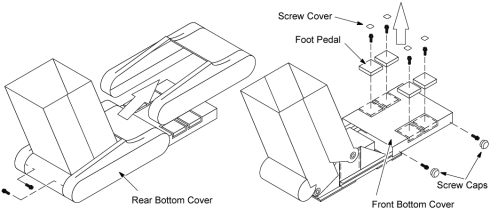
- Unscrew the two screws and remove the rear bottom cover.
- Remove the four screw covers from foot pedals.
- Unscrew the four Allen screws and remove the four foot pedals.
- Remove the four screw caps from the front bottom cover.
- Unscrew the four screws and remove the front bottom cover.
Figure 1. Table Front and Bottom Covers
 |
2 Top Cover / Middle Side Cover
Procedure
- notice
- Move the cradle OUT to its fully retracted position (farthest from Gantry).
- Raise the Table to its highest position.note:
If the Table up/down movement is inoperative, use the service power cable to raise the Table (refer to Enforced Table Elevation).
- Remove power from Table by turning off “HVDC” , “120VAC” and “Axial Drive” and switches on the service switch panel.
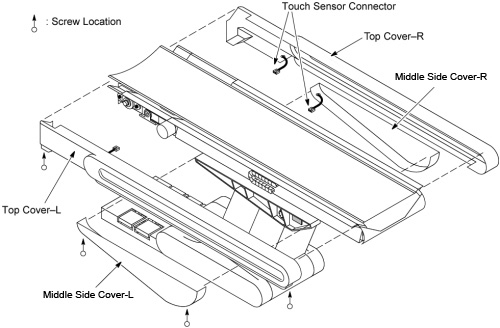
- Remove the top cover(left or right) bottom holding screws. TheFigure 2 shows the screw locations.
- Slide the top cover (left or right) free from the Table until the touch sensor switch connectors are visible.
- Disconnect the touch sensor switch cable connectors.
- Remove the top cover (left or right).
- Remove the Middle Side cover (left or right) bottom holding screws. TheFigure 2 shows the screw locations.
- Slide the Middle Side cover (left or right) free from the Table until the touch sensor switch connector is visible.
- Disconnect the touch sensor switch cable connector.
- Remove the Middle Side cover (left or right).
Figure 2. Table Top Covers / Middle Side Covers
|
3 Finalization
- Verify all covers are properly secured.