- Topic ID: id_17423036
- Version: 5.0
- Date: Jan 20, 2020 8:35:49 PM
RC232 Communication Cable Replacement
Prerequisites
Overview
This procedure defines the necessary steps to Remove and Install the RC232 Communication Cable (CFHC ↔ DAS Backplane).
1 Preparation
Procedure
- Move table to home position, fully out and down.
- Remove right side gantry cover.
Refer to Parts Replacement → Gantry → Enclosure → (Cover Removal Procedure).
- Stop the rotor of X-ray tube in case of Liquid Bearing Tube before HVDC off. Refer to Liquid Bearing Tube Rotor stop procedure for details.
- Turn OFF the Axial Drive and HVDC switches on the gantry’s Service Switch Panel.
- Position the detector at 12 o'clock and lock gantry rotation.
- Turn OFF the 120 VAC switch on the gantry’s Service Switch Panel.
- Remove the gantry left side cover, top covers and front cover.
2 Replacement Procedure
Procedure
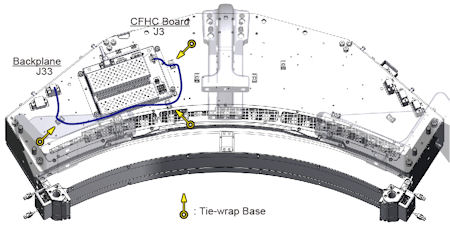
- Cut tie-wraps holding the cable to DAS assembly.
- Disconnect all cable connectors of the RC232 communication cable, and remove the cable.
- Put the new RC232 cable into place, and connect all cable connectors of it.
- Secure the RC232 cable using tie-wraps.
Figure 1. RC232 Cable Wiring
- Rotate the gantry by hand to ensure there is no interference between the RC232 cable and stationary components.
3 Gantry Reassembly
Procedure
- Make sure the Axial Drive, HVDC and 120 VAC switches on the gantry’s Service Switch Panel are OFF.
- Release the gantry rotational lock and install gantry covers,
all except the right side cover.
Refer to Replacement → Gantry → Enclosure → (Cover Removal Procedures).
- Turn on the 120 VAC, HVDC and Axial drive service switches.
- Install gantry right side cover.