- Topic ID: id_18480723
- Version: 3.0
- Date: Jan 20, 2020 8:32:28 PM
HP Host Computer Z800 Scanfile HDD Replacement
Prerequisites
Overview
Procedure
- Select one of the following methods to Power OFF the Operator
Console:
- If Applications are up, click on the Shut Down button and select Shutdown.
The Operator Console monitor will display a 'Power Down' message when it is acceptable to power OFF the Operator Console.
- If Applications are down, open a Unix Shell. Type: halt.
- If Applications are up, click on the Shut Down button and select Shutdown.
- Power OFF the console at the front panel switch.
- Remove the front and left side covers from the console.
Refer to
- Remove the side access panel from the host computer (Z800).
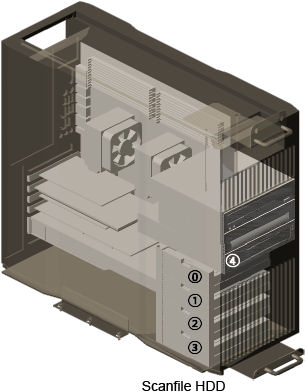
- Replace the existing scanfile hard disk drive (HDD) with new
one.
Figure 1. Scanfile Hard Disk Drive
- Reinstall the side access panel.
note:
Disk drivers listed in 3.2 Replacement Parts are fully compatible. Mixed HDD configuration is allowed.
Finalization
- Power ON the operator console. Start up sequence stops before application start up.
- Run “Reconfig”, and select “Recreate Scan
Disk Array” (2 or more HDD replacement) or “Rebuild Scan
Disk Array” (only one HDD replacement), and press “Accept”.
note:
Rebuild Scan Disk Array takes approximately 20 minutes.
- System reboots automatically and stops before application.
- Open shell window and type st to start up application.
- Refer to System Scanning Test to confirm proper operation.
- Reinstall the console covers.