- Topic ID: id_18480714
- Version: 3.0
- Date: Jan 20, 2020 8:35:40 PM
HP Host Computer Z800 Replacement
Prerequisites
Overview
1 Removal Procedure
Procedure
- Select one of the following methods to Power OFF the Operator
Console:
- If Applications are up, click on the Shut Down button and select Shutdown.
The Operator Console monitor will display a 'Power Down' message when it is acceptable to power OFF the Operator Console.
- If Applications are down, open a Unix Shell. Type: halt.
- If Applications are up, click on the Shut Down button and select Shutdown.
- Power OFF the console at the front panel switch.
- Remove the front and top covers.
Refer to
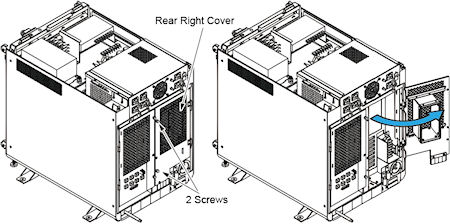
- Loosen two screw of the rear right cover, and open the rear
right cover.
Figure 1. Rear Right Cover
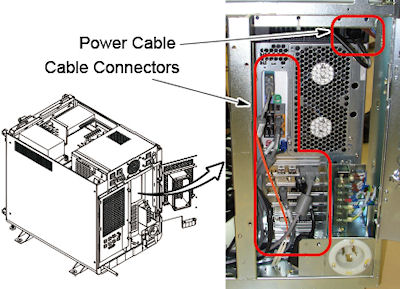
- Disconnect the power cable and all cable connectors from z800.
Figure 2. Z800 Rear View
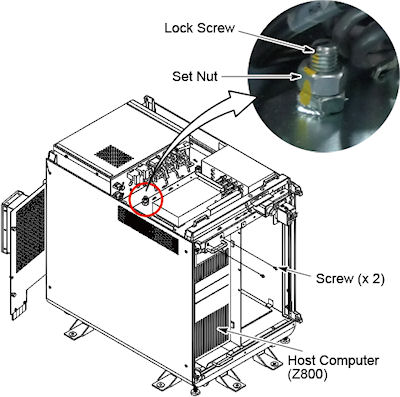
- Remove two screw that hold the z800 to the console chassis.
- Loosen the set nut, and loosen the lock screw.
Figure 3. Set Nut and Lock Screw
 caution
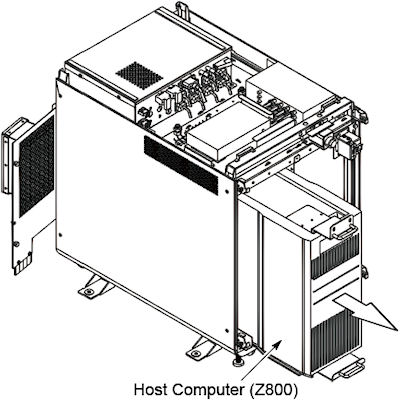
- Slide the host computer (z800) out of the console.
Figure 4. Host Computer (Z800) Removal
 |
2 Installation Procedure
Procedure
- Spare part Z800 (5700000-x) does not have FDIP card, then replace
the card from old Z800.
Z800 (5720000-x) does not have FDIP and RAID cards, then replace them from old Z800.
- Slide the new host computer into the Operator Console from the front.
- Tighten the two screws to secure the host computer to the chassis of console.
- Tighten the lock screw to fix the host computer, and tighten the set nut.
- Re-Connect the power cable and all cable connectors.
- Power ON the Operator Console at the console’s front panel switch.
- Verify that the host computer has powered up and is not displaying or sounding any errors.
- In order to assure proper operation of the host computer it is necessary to perform software Load from Cold (LFC).
- After completing the software LFC, make certain that you perform a final Save System State.
3 Finalization
Procedure
- After completing the LFC procedure, perform a complete shutdown of the Operator Console and restart the system.
- Reinstall the console covers.