- Topic ID: id_15460384
- Version: 4.0
- Date: Jan 20, 2020 8:33:40 PM
Elevation Inching Adjustment
Prerequisites
Overview
Procedure
- Move the Table to '-116 mm' height according to the elevation display on the Gantry.
- Press the Table down button ten times quickly (within 200msec / one press), and verify that the Table movement is within 1 mm ~ 7 mm (i.e. the elevation display indicates within '-117 mm ~ -123 mm').
- If not, perform the elevation inching adjustment as follows:
- Raise the Table to its highest position.
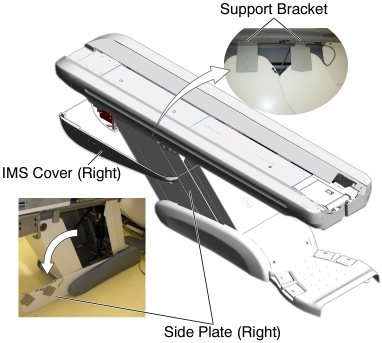
- Remove the IMS side cover (right).
- Remove two upper support brackets of the side plates by unscrewing
2 (x2) screws, and put the side plates on the floor.
Figure 1. Side Plate (Right)
- notice
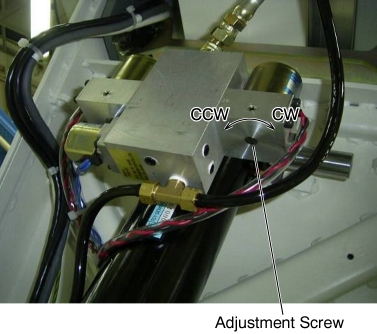
- Rotate the adjustment screw approximately 20 degrees in the
following direction.
Figure 2. Adjustment Screw
- Return to Step 1 to perform the elevation inching check again.

- Move the Table to '-216 mm' height according to the elevation display on the Gantry.
- Press the Table down button ten times quickly (within 200msec / one press), and verify that the Table movement is within 1 mm ~ 7 mm (i.e. the elevation display indicates '-217 mm ~ -223 mm').
- If not, perform the elevation inching adjustment according to Step 3, and return to Step 4 to perform the elevation inching check again, then return to Step 1 to recheck the elevation inching.
Finalization
No finalization steps.