- Topic ID: id_15460393
- Version: 4.0
- Date: Jan 20, 2020 8:32:04 PM
Cradle Absolute Encoder Replacement
Prerequisites
Overview
Procedure
- Raise the Table to maximum height.
- Move the Cradle and IMS to OUT limit position.
- Remove power from Table by turning off 120VAC, Axial Drive and HVDC switches on Service Switch Panel.
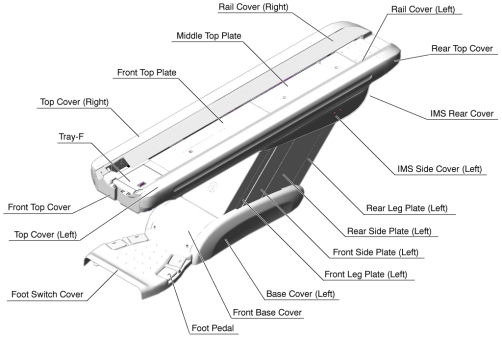
- Remove the following Table components and covers:
-
Cradle
-
Top Cover (R/L)
-
Rear Top Cover
-
Rail Cover (R/L)
-
Top Plate (Front/Middle/Rear)
Figure 1. Table Covers
-
- Cut any tie-wraps holding the Encoder cable to the Table frame.
- Disconnect the Encoder cable connector.
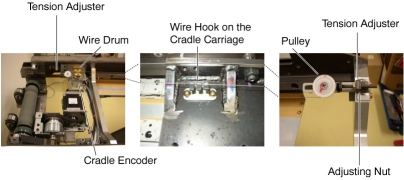
- Attach an adhesive tape to the wire drum, in order to avoid loosening the wire.
- Attach an adhesive tape to the wire hook on the cradle carriage.
- Loosen the adjusting nut, to remove tension from the cradle
wire.
Figure 2. Cradle Encoder Assembly
- Loosen 2 set screws on the wire drum, then remove the wire drum
from the Encoder.
Figure 3. Cradle Encoder Removal
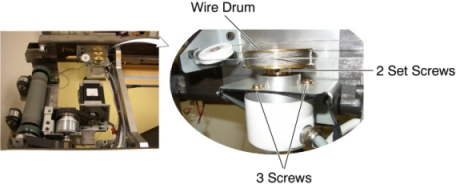
- Unscrew 3 screws, and remove the Encoder from the Table.
- Install the new Encoder in place, and tighten the 3 screws.
- Re-install the wire drum to the Encoder, and tighten the 2 set
screws, to fasten the wire drum.
Figure 4. Tension Adjuster
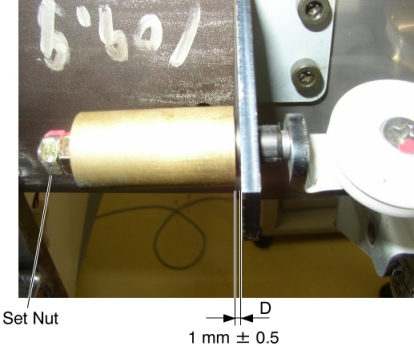
- Turn the adjusting nut in the CW direction until the distance D is 1 ± 0.5 mm, and tighten the set nut.
- Take off the adhesive tapes from the wire drum and the wire hook.
- Re-connect the Encoder cable connector, and fasten the cable to the Table frame with tie-wraps.
- Move the cradle manually IN and OUT, and verify that the cradle movement is smooth.
Finalization
- Power up the Table from the Service Switch Panel.
- Perform Cradle Characterization.
- Turn off all 3 switches (Axial Drive, HVDC, 120VAC), and re-intall the cradle and Table covers.