- Topic ID: id_16157532
- Version: 4.0
- Date: Jan 20, 2020 8:35:39 PM
Cradle Absolute Encoder Replacement
Prerequisites
Overview
Procedure
- Raise the Table to maximum height.
- Perform this step if applicable:
(For Global PET/CT Table, with fixed position IMS) Move the Cradle to OUT limit position.
(For Global PET/CT Table) Move the Cradle and IMS to OUT limit position.
(For GT1700 and GT2000 Table) Move the Cradle and IMS to OUT limit position.
(For GT1700V Table) Move the Cradle to OUT limit position.
- Remove power from Table by turning off 120VAC, Axial Drive and HVDC switches on Service Switch Panel.
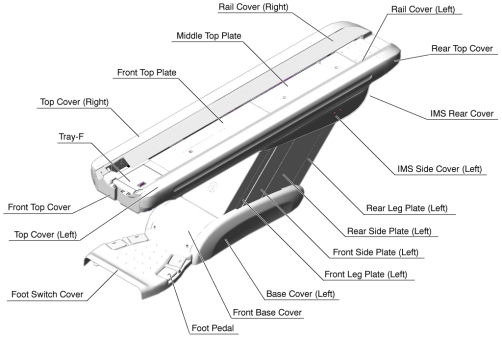
- Remove the following Table components and covers:
-
Cradle
-
Top Cover (R/L)
-
Rear Top Cover
-
Rail Cover (R/L)
-
Top Plate (Front/Middle/Rear)
Figure 1. Table Covers
-
- Cut any tie-wraps holding the Encoder cable to the Table frame.
- Disconnect the Encoder cable connector.
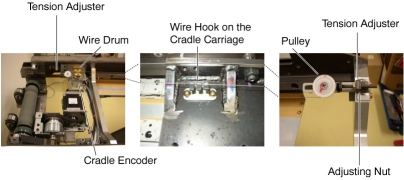
- Attach an adhesive tape to the wire drum, in order to avoid loosening the wire.
- Attach an adhesive tape to the wire hook on the cradle carriage.
- Loosen the adjusting nut, to remove tension from the cradle
wire.
Figure 2. Cradle Encoder Assembly
- Loosen 2 set screws on the wire drum, then remove the wire drum
from the Encoder.
Figure 3. Cradle Encoder Removal
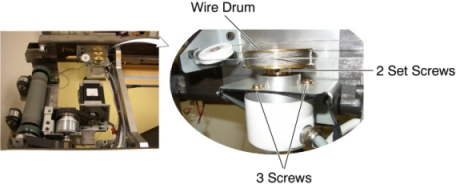
- Unscrew 3 screws, and remove the Encoder from the Table.
- Install the new Encoder in place, and tighten the 3 screws.
- Re-install the wire drum to the Encoder, and tighten the 2 set
screws, to fasten the wire drum.
Figure 4. Tension Adjuster
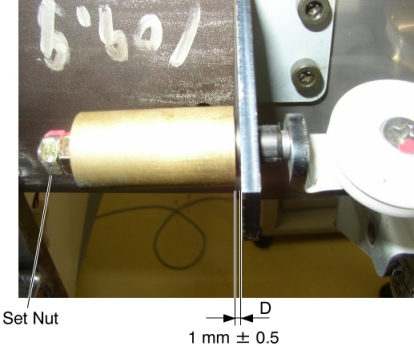
- Turn the adjusting nut in the CW direction until the distance D is 1 ± 0.5 mm, and tighten the set nut.
- Take off the adhesive tapes from the wire drum and the wire hook.
- Re-connect the Encoder cable connector, and fasten the cable to the Table frame with tie-wraps.
- Move the cradle manually IN and OUT, and verify that the cradle movement is smooth.
Finalization
- Power up the Table from the Service Switch Panel.
- Perform Cradle Characterization.
- Turn off all 3 switches (Axial Drive, HVDC, 120VAC), and re-intall the cradle and Table covers.