- Topic ID: id_18480359
- Version: 6.0
- Date: May 22, 2020 3:59:41 AM
Configuring Gantry Tilt for Extender Removal
Prerequisites
Overview
This document describes how to enable the Gantry Tilt for Extender Removal feature on CT system. When this feature is enabled, the gantry and Table behaves as follows:
This feature is available on the following products:
-
Revolution EVO with 16HW14.x or later software
-
Optima CT660 with 16HW45.x or later software
- LightSpeed VCT with 16HW36.x or later software
Gantry Tilt for Extender Removal : On
-
The Load foot pedal moves to 0 degree if the gantry is tilted.
-
The Unload foot pedal moves the gantry to 8 degrees forward
Figure 1. Gantry Table User Preference Window
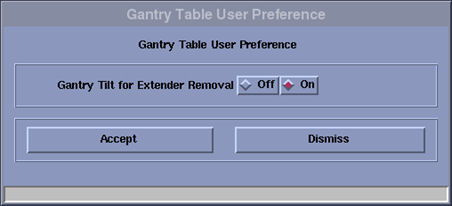
Figure 2. Gantry Table User Preference Window on Revolution EVO 18HWxx.x or later software
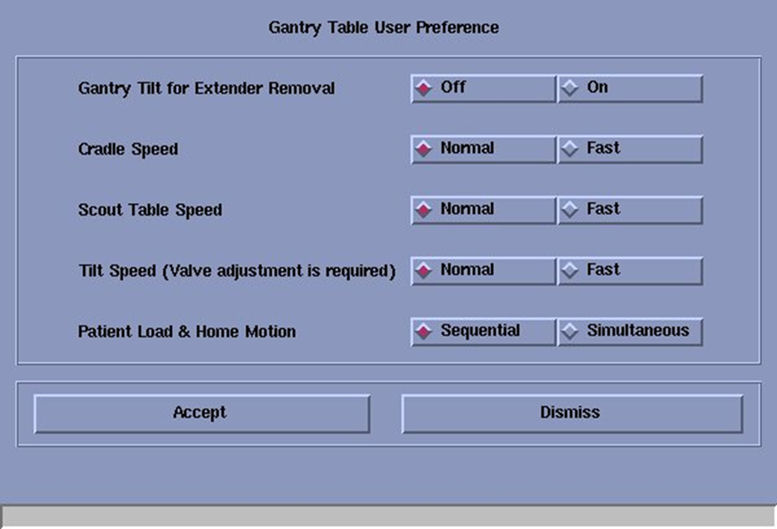
- Cradle moving speed will change to 175mm/sec then using Fast IN/Out button on Gantry Control Panel. (Normal speed is 125mm/sec)
- Cradle moving speed will change to 10mm/sec then IN/OUT button on Gantry Control Panel. (Normal speed is 5mm/sec)
Scout Table Speed : Fast
Scout table moving speed will become to 175 mm/s. (Normal speed is 100mm/s)
Tilt Speed : Fast
- Tilting -30deg to +30deg in 40sec +/- 20%
- Gantry tilt moving speed will become to 1.5deg/Sec
- Patient Load (Load Pedal Motion) - Move both Elevation and IMS/Cradle until they reach the each target position.
- Home Motion (Home Pedal Motion) - Move gantry tilt to 0 degree, Cradle/IMS outward, and Elevation downward until they reach the home positions simultaneously.
Procedure
- Click the Service Icon on the Display Monitor, and the Common Service Desktop (CSD) will appear.
- Select the Configuration Tab on the CSD and find the Gantry Table User Preference in the menu.
- The Gantry Table User Preference window will appear.
- The Select On, Fast, sumultaneous for activate each feature.
Figure 3. Configuration Tab on CSD
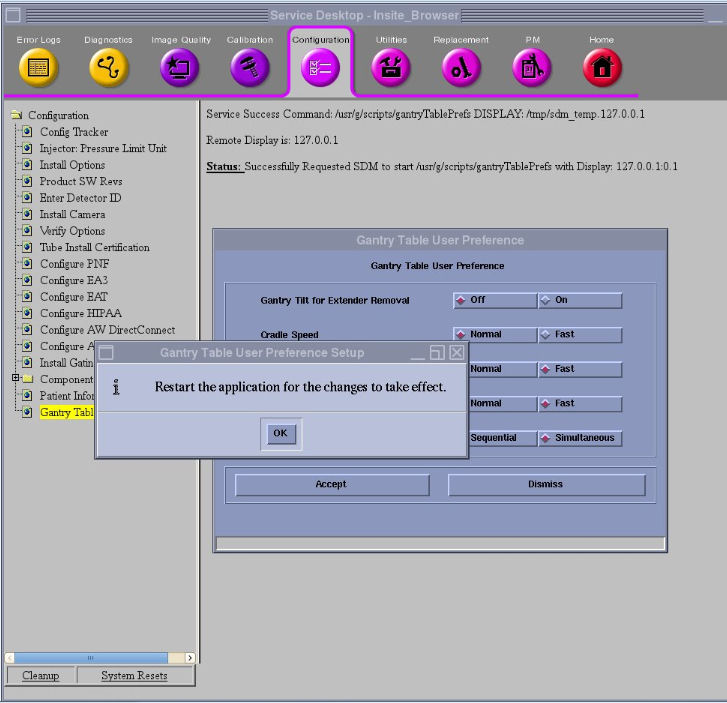
- Click Accept .
- Reboot the system.
Finalization
- Confirm the gantry and table behaves as expected.