- Topic ID: id_18480344
- Version: 6.0
- Date: Apr 9, 2020 8:41:23 PM
Configure HIPAA Procedure
Prerequisites
Overview
This document describes how to enable Data Privacy (User Authorization) feature on CT system.
This procedure applies to the following systems:
-
Revolution EVO (16HW14.x or later software version)
-
LightSpeed 5.x HP60-16
Procedure
- Click the Service Icon on the Display Monitor, and the Common Service Desktop (CSD) will appear.
- Select the Configuration Tab on the CSD
and find the Configure HIPAA selection
in the menu.
Figure 1. Common Service Desktop
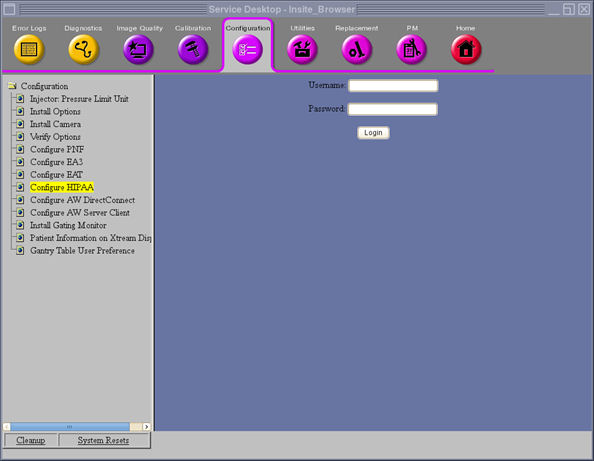
- Login as EA3 admin user. Ask Customer’s system administrator to login.
- In the next screen, select HIPAA ON and
click SUBMIT.
Figure 2. HIPAA Selection
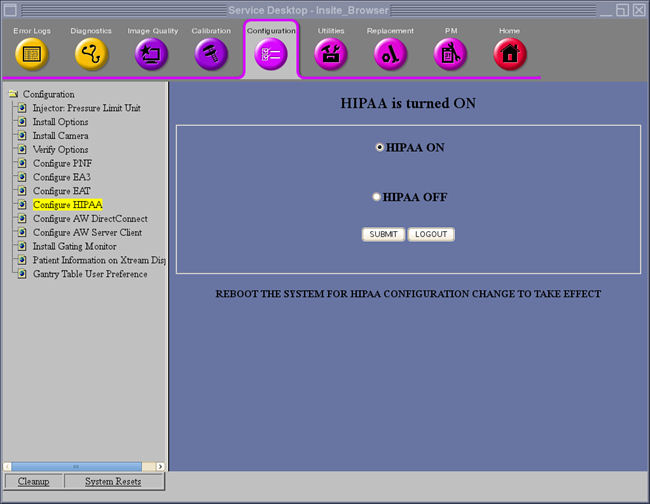
- Reboot the system to for HIPAA configuration change to take effect.
Finalization
No finalization steps.