- Topic ID: id_15460901
- Version: 4.0
- Date: Dec 29, 2020 12:59:15 AM
Cardiac Monitor (IVY) Installation
Prerequisites
Overview
This procedure applies to CT and PET/CT systems with the Integrated Peripheral Controller (IPC) board or the Gantry Options Board (GOB). The IVY 3150-B is a replacement for the IVY 3150-A.
1 IVY 3150 (B) Cardiac Monitor Installation
Contents of the Cardiac Monitor collector are shown in Table 2.
Procedure
- Setup/assemble the Cardiac Monitor cart. (Refer to assembly manual.)
- Attach the Cardiac Monitor to the cart.
- Refer to Figure 1 for the remaining steps in this section.
Figure 1. IVY 3150-B Cardiac Monitor
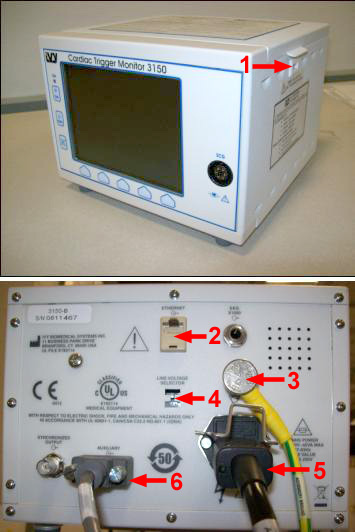
- Verify Voltage Line Select switch is set to 115V.
- (For systems with IPC only) Attach Ground cable to Ground Lug at rear of Cardiac Monitor.
- Connect AC (IEC) power cable to the back of the Cardiac Monitor.
- To proceed:
- (For replacing an IVY 3150-B on systems with an IPC) Connect the AC (IEC) power cable to the Power connector (IEC) at the Gantry Options Panel (IPC).
- (For replacing an IVY 3150-A with an IVY 3150-B on systems with a GOB Board) The IEC power cable provided will not be used in all cases. If necessary, reuse the existing power cable and power connection used prior to this replacement. Place unused cables in Service Cabinet for possible use upon any future system upgrade.
- Connect signal cable 237346-4 and 237436-5 according to Table 3.
2 Enabling the IVY 3150 Cardiac Monitor
Procedure
- At the console select:
- Common Service Desktop.
- Configuration tab.
- Install Gating Monitor.
- From the menu select:
- IVY3150.
-
Accept.note:
This automatically sets up the monitor at IP address 10.44.22.21.
3 IVY 7800 Cardiac Monitor Installation
Procedure
- Setup/assemble the Cardiac Monitor cart. (Refer to assembly manual.)
- Attach the Cardiac Monitor to the cart.
- Refer to Figure 2.
Figure 2. IVY 7800 Monitor Front and Rear View
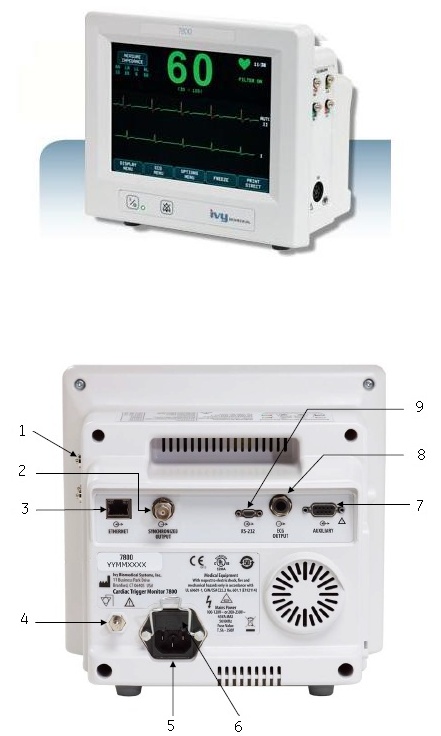
- (For systems with IPC only) Attach Ground cable to Ground Lug at rear of Cardiac Monitor and Ground Lug on the IPC Panel.
- Connect AC (IEC) power cable to the back of the Cardiac Monitor.
- To proceed:
- (For replacing an IVY 3150-B or IVY 7800 on systems with an IPC) . Connect the AC (IEC) power cable to the Power connector (IEC) at the Gantry Options Panel (IPC).
- (For replacing an IVY 3150-A with an IVY 3150-B or IVY 7800 on systems with a GOB Board) . The IEC power cable provided will not be used in all cases. If necessary, reuse the existing power cable and power connection used prior to this replacement. Place unused cables in Service Cabinet for possible use upon any future system upgrade.
- Connect signal cable 237346-4 and 237436-5 according to Table 3.
4 Enabling the IVY 7800 Cardiac Monitor
Procedure
- At the console select:
- Common Service Desktop.
- Configuration tab.
- Install Gating Monitor.
- From the menu select:
- 7800.
-
Accept.note:
This automatically sets up the monitor at IP address 10.44.22.21
5 Finalization
No finalization steps.