- Topic ID: id_18480179
- Version: 3.0
- Date: Jan 20, 2020 8:34:38 PM
64 slice option Installation
Prerequisites
Overview
This procedure describes how to install 64 slice option on Optima CT660 series.
Procedure
- Confirm that the system has been started up normally.
- Install 64 slice option key DVD from INSTALL OPTIONS menu of CSD. Refer to “Install Software Options” procedure for details.
- Reboot the system.
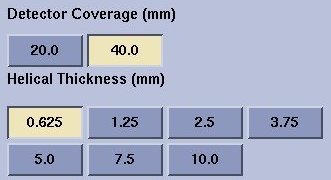
- Create scanRx using 40mm Detector Coverage and 0.625mm Helical
Thickness, GUI example is shown below, and execute the scanning.
Then confirm the images are reconstructed without error. The GUI
is only available when 64 slice option is installed.
Figure 1. Detector Coverage and Helical Thickness
Finalization
No finalization steps.