- Topic ID: id_18480654
- Version: 2.0
- Date: Dec 21, 2018 2:36:26 AM
Scan Data Path Diagnostic (HDAS with SDCB)
1 Overview
The Scan data path diagnostic is intended to aid in troubleshooting intermittent failures along the scan data path from the A/D boards of the Digital Module (FRDM) and Console.
There are two main tabs on the top left for Automated and Manual test selections. The automated test selections run without any user intervention. The manual tests require manual intervention such as loopback testing that requires manual cable connection changes. Grouped in with the manual tests is also the Power supply reporting that checks all power supply voltages in the DAS/Detector subsystem.
Figure 1. Scan Data Path Screen
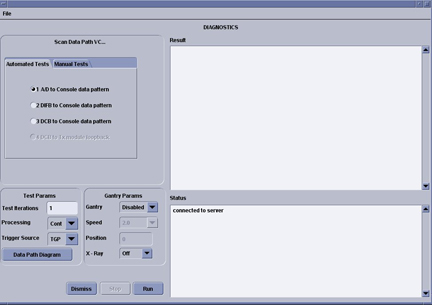
Test 1 runs a known data pattern from the A/D board back to the console. The Host then compares the data pattern to the known pattern and indicates any difference as an error. Test 2 and 3 work the same way from the SDCB.
There are several test options available in the bottom left of the GUI to aid in troubleshooting problems that may be caused by interactions with other gantry functions. These test options are grouped into Gantry options and Other Options and are further defined below:
-
Test Iterations – allows the user to run multiple tests back to back to test for intermittant issues.
-
Processing – Continuous mode that run the tests until completion or Stop mode that will stop on the first error.
-
Trigger Source – trigger data collection using the normal TGP source or the SDCB internally generated triggers.
-
Gantry – Disabled is the default, Enabled opens the Speed field for the user to select a rotation speed, Position opens the position field to allow the user to select a specific tube position (typical for slipring antenna troubleshooting). Gantry rotation enabled or position selected requires a Scan button press to initiate the test.
-
Speed – Selectable gantry speed once Gantry rotation is enabled.
-
Position – Allows an entry from 0-359. Value represents the tube location with zero at the top of the gantry and moving clockwise around the gantry.
-
Xray – Turns xray on or off for the test scan. A low technique scan is used with the filter closed and collimator at its smallest opening. Xray enabled requires a Scan button press to initiate the test.
2 Data Patterns
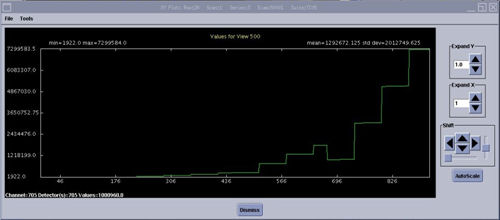
Data pattern test results for the A/D and SDCB boards can be viewed using Scan Analysis. Note the Exam and series for the desired test to view in the result screen of the Scan Data Path GUI. The following example screens show the data patterns to be expected from each test. The data patterns shown are the View Vs Channels (VVC) plot of one channel using all default settings within Scan Analysis. All Channels will look the same.
Figure 2. HDAS (with SDCB) A/D Data Pattern
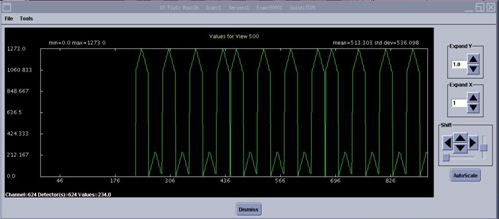
Figure 3. HDAS SDCB (Slave) Data Pattern
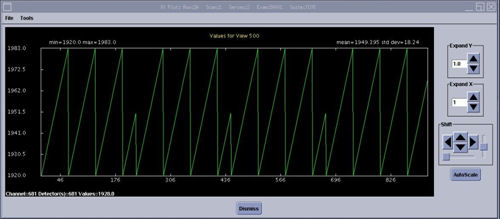
Figure 4. HDAS SDCB (Master) Data Pattern
3 Show Power Supplies
The Manual tab - Show Power Supplies button when selected and run will display a list of SDCB power supplies. See example output below. Some detector types will only show the odd numbered DIFB's.
A log file is also generated of this output data. The log file is found in /usr/g/service/state and is called “ssw.powerSupply.log”. This is a text file of the same output sent to the screen.
The SDCB power supplies are all read as listed.
Scan Analysis Aux channels can be used to plot all the power supplies and temperature readings taken during any scan currently on the system.
Below is an example output. The actual supplies and data shown will be different depending on the DAS type.
DCB POWER SUPPLIES (Volts):
---------------------------------------------------
Channel LSL USL Actual P/F
---------------------------------------------------
+3.3_Analog 3.04 3.56 3.22 Pass
+3.3_Digital 3.04 3.56 3.30 Pass
-5.0_Analog -5.40 -4.60 -5.04 Pass
+5.0_Analog 4.60 5.40 4.89 Pass
+48 44.16 51.84 47.43 Pass
+48_rtn -0.50 0.50 0.11 Pass
---------------------------------------------------
POWER MODULE POWER SUPPLIES (Volts):
------------------------------------------------------------
+1.2V DIG +2.5 DIG +2.5 ANA -2.5 ANA +3.3 DIG
------------------------------------------------------------
PS_PMMod#_# LSL USL Actual P/F
------------------------------------------------------------
+1.2_Dig_ModLow_1 1.10 1.30 1.19 Pass
+1.2_Dig_ModLow_2 1.10 1.30 1.20 Pass
+2.5_Dig_ModLow_1 2.30 2.70 2.50 Pass
+2.5_Dig_ModLow_2 2.30 2.70 2.50 Pass
+2.5_Dig_ModLow_3 2.30 2.70 2.49 Pass
+2.5_Dig_ModLow_4 2.30 2.70 2.47 Pass
+2.5_Dig_ModLow_5 2.30 2.70 2.46 Pass
+2.5_Dig_ModLow_6 2.30 2.70 2.47 Pass
+2.5_Dig_ModLow_7 2.30 2.70 2.47 Pass
+2.5_Ana_ModLow_1 2.30 2.70 2.49 Pass
+2.5_Ana_ModLow_2 2.30 2.70 2.49 Pass
+2.5_Ana_ModLow_3 2.30 2.70 2.46 Pass
+2.5_Ana_ModLow_4 2.30 2.70 2.46 Pass
+2.5_Ana_ModLow_5 2.30 2.70 2.44 Pass
+2.5_Ana_ModLow_6 2.30 2.70 2.45 Pass
+2.5_Ana_ModLow_7 2.30 2.70 2.44 Pass
-2.5_Ana_ModLow_1 -2.70 -2.30 -2.45 Pass
-2.5_Ana_ModLow_2 -2.70 -2.30 -2.46 Pass
-2.5_Ana_ModLow_3 -2.70 -2.30 -2.46 Pass
-2.5_Ana_ModLow_4 -2.70 -2.30 -2.46 Pass
-2.5_Ana_ModLow_5 -2.70 -2.30 -2.43 Pass
-2.5_Ana_ModLow_6 -2.70 -2.30 -2.42 Pass
-2.5_Ana_ModLow_7 -2.70 -2.30 -2.42 Pass
-2.5_Ana_ModLow_8 -2.70 -2.30 -2.44 Pass
-2.5_Ana_ModLow_9 -2.70 -2.30 -2.44 Pass
-2.5_Ana_ModLow_10 -2.70 -2.30 -2.43 Pass
-2.5_Ana_ModLow_11 -2.70 -2.30 -2.45 Pass
-2.5_Ana_ModLow_12 -2.70 -2.30 -2.42 Pass
-2.5_Ana_ModLow_13 -2.70 -2.30 -2.43 Pass
-2.5_Ana_ModLow_14 -2.70 -2.30 -2.43 Pass
+3.3_Dig_ModLow 3.04 3.56 3.25 Pass
+1.2_Dig_ModHigh_1 1.10 1.30 1.15 Pass
+1.2_Dig_ModHigh_2 1.10 1.30 1.17 Pass
+2.5_Dig_ModHigh_1 2.30 2.70 2.46 Pass
+2.5_Dig_ModHigh_2 2.30 2.70 2.47 Pass
+2.5_Dig_ModHigh_3 2.30 2.70 2.49 Pass
+2.5_Dig_ModHigh_4 2.30 2.70 2.49 Pass
+2.5_Dig_ModHigh_5 2.30 2.70 2.50 Pass
+2.5_Dig_ModHigh_6 2.30 2.70 2.50 Pass
+2.5_Dig_ModHigh_7 2.30 2.70 2.50 Pass
+2.5_Ana_ModHigh_1 2.30 2.70 2.43 Pass
+2.5_Ana_ModHigh_2 2.30 2.70 2.45 Pass
+2.5_Ana_ModHigh_3 2.30 2.70 2.43 Pass
+2.5_Ana_ModHigh_4 2.30 2.70 2.48 Pass
+2.5_Ana_ModHigh_5 2.30 2.70 2.46 Pass
+2.5_Ana_ModHigh_6 2.30 2.70 2.50 Pass
+2.5_Ana_ModHigh_7 2.30 2.70 2.48 Pass
-2.5_Ana_ModHigh_1 -2.70 -2.30 -2.42 Pass
-2.5_Ana_ModHigh_2 -2.70 -2.30 -2.42 Pass
-2.5_Ana_ModHigh_3 -2.70 -2.30 -2.44 Pass
-2.5_Ana_ModHigh_4 -2.70 -2.30 -2.45 Pass
-2.5_Ana_ModHigh_5 -2.70 -2.30 -2.44 Pass
-2.5_Ana_ModHigh_6 -2.70 -2.30 -2.42 Pass
-2.5_Ana_ModHigh_7 -2.70 -2.30 -2.44 Pass
-2.5_Ana_ModHigh_8 -2.70 -2.30 -2.43 Pass
-2.5_Ana_ModHigh_9 -2.70 -2.30 -2.41 Pass
-2.5_Ana_ModHigh_10 -2.70 -2.30 -2.46 Pass
-2.5_Ana_ModHigh_11 -2.70 -2.30 -2.49 Pass
-2.5_Ana_ModHigh_12 -2.70 -2.30 -2.46 Pass
-2.5_Ana_ModHigh_13 -2.70 -2.30 -2.47 Pass
-2.5_Ana_ModHigh_14 -2.70 -2.30 -2.45 Pass
+3.3_Dig_ModHigh 3.04 3.56 3.25 Pass
------------------------------------------------------------