- Topic ID: id_2030490
- Version: 2.0
- Date: Sep 13, 2021 2:15:12 AM
PNF CONFIGURATION REQUIRED FOR CYBER SECURITY INSTALLATION
Procedure
- System firewall will be turned “On” at all times.
- FE can turn “Off” System firewall until next boot with Class M key.
- Remote user can turn “Off” System firewall.
- To check the firewall status, perform the following:
- Open Service Tools > Common Service Desktop (CSD)
- Click on “Configuration” Tab and select “Configure Enhanced PNF”
- Confirm status of Firewall.
Figure 1. PNF Configuration
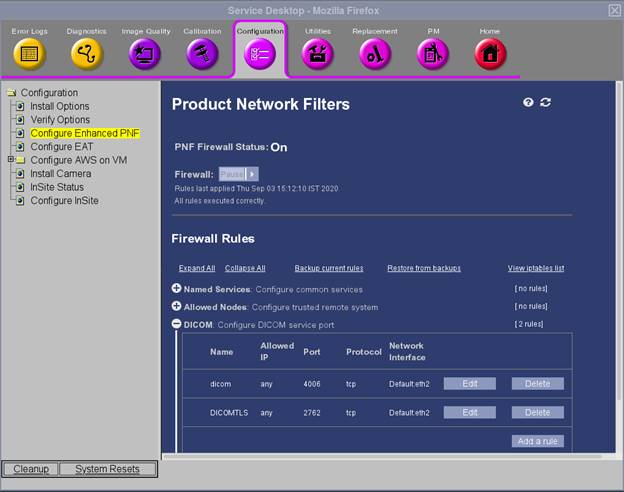
Any existing filters on the system will be displayed. Review and remove any filters that are not needed.
By default, all inbound connections are blocked by the Revolution CT System’s internal firewall, with the exemptions listed in the table below.
The column "Recommended configuration of network infrastructure" describes the suggested configuration of the network infrastructure regarding the different network services.
Figure 2. PNF Configuration with Class M key
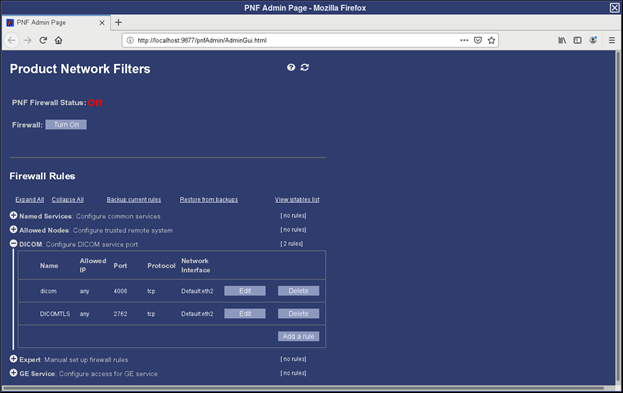 note: * Configure PNF can be opened irrespective of which user logged in, if valid Class M key is insertednote: Note that ports configured can be different from defaults listed above. Firewall configuration should be updated accordingly