- Topic ID: id_2030751
- Version: 2.0
- Date: Sep 13, 2021 2:15:13 AM
Reset Admin User Password/Reset Service User Password
1 Reset Admin User Password
Prerequisites
When Site administrator forgets the EA3 admin password, admin activities such as creating new user accounts cannot be performed. Following procedure can be used to reset admin password. Note Class M key is required to successfully reset the EA3 admin password
Procedure
- Log in as Emergency user at EA3 prompt.
- Insert Class M key to console.
- From the System utilities Menu, select System Tools > Check Security.
- From the System utilities Menu, select System Tools > Service> Service Tools > Utilities.
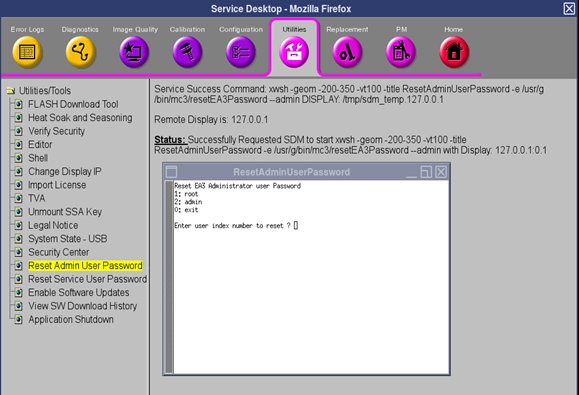
- Select Reset Admin User Password from Utilities tab.
Figure 1. Reset Admin User Password
- In ResetAdminUserPassword pop-up, enter index corresponding to EA3 admin user which you want to reset and choose "yes" while ask for confirmation "Are you sure ?".
Figure 2. Reset Admin User Password -Inputs
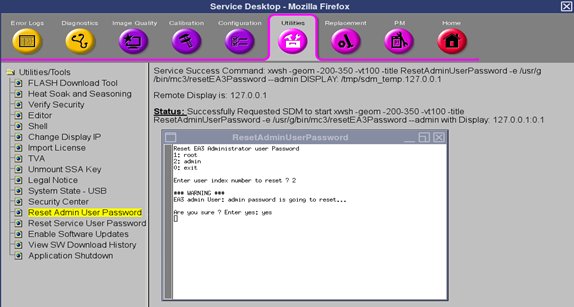
- ResetAdminUserPassword pop-up gets closed while admin password reset is successful.
- Choose Switch User from the System utilities menu
- Login as admin user (with default password “install@install” ) and reset the admin password.
- System is back to working state.
- Save System State from System Tools > Service> Service Tools > Utilities> System State - USB .
Recommendation: System should have at least two user admin accounts. One would act as back up account.
2 Reset Service User Password
Prerequisites
Following procedure can be used to reset EA3 service user password if EA3 admin credentials is not available to FE. Note, Class M key is required to successfully reset the EA3 service user password.
Procedure
- Log in as Emergency user at EA3 prompt.
- Insert Class M key to console.
- From the System utilities Menu, select System Tools > Check Security.
- From the System utilities Menu, select System Tools > Service> Service Tools > Utilities.
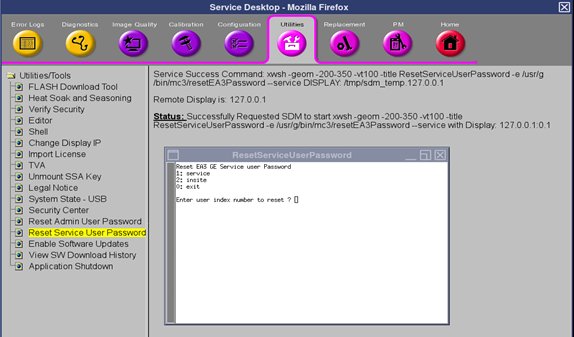
- Select Reset Service User Password from Utilities tab.
Figure 3. Reset Service User Password
- In ResetServiceUserPassword pop-up, enter index corresponding to EA3 GE service user which you want to reset and choose "yes" while ask for confirmation "Are you sure ?" .
Figure 4. Reset Service User Password -Inputs
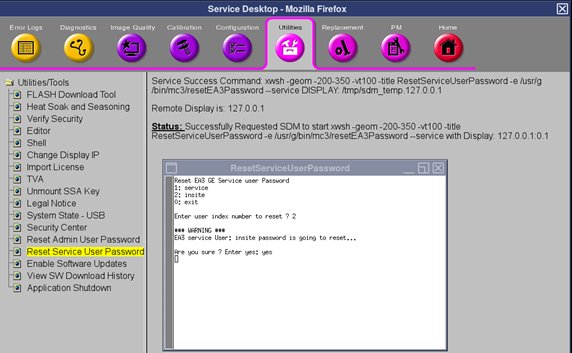
- ResetServiceUserPassword pop-up gets closed while service user password reset is successful.
- Choose Switch User from the System utilities menu.
- Login as service user (with default password “install@install”) and reset the service user password.
- System is back to working state.