- Topic ID: id_16157896
- Version: 2.0
- Date: Jun 10, 2020 2:45:36 AM
PDAS ADB Mid Plenum Filter Replacement
Prerequisites
1 ADB Mid Plenum Filter Removal
Procedure
- Position the Table to its lowest position.
- Remove the Gantry right side cover.
- notice
- Turn OFF Axial Enable, HVDC, and 120VAC switches on the Service Switch panel.
- Remove the gantry left side, top and front covers.
- Position the PDAS at the 12 o'clock position
- Lock the Gantry in position, using the rotational lock.
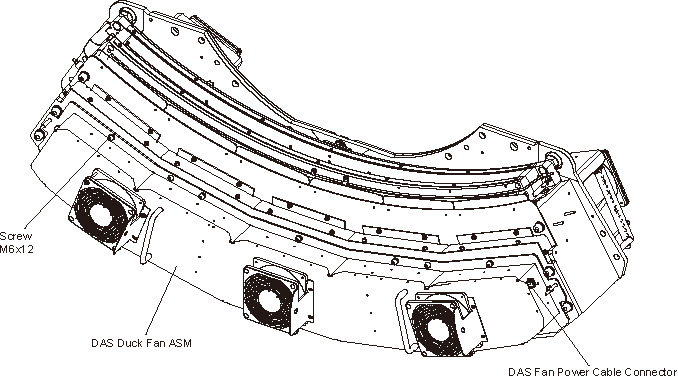
- Disconnect the fan power cable from the PDAS Duck Fan Cover.
- Remove the PDAS Duck Fan Cover by unscrewing its M6x12 allen
screws by a
 on the PDAS Duck Fan Cover.
Figure 1. Remove the PDAS Duck Fan ASM
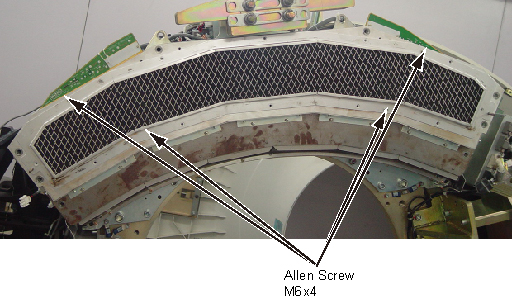
- Remove the PDAS ADB Mid Plenum Filter by unscrewing its M6x4
allen screws.
Figure 2. Remove PK ADB Mid Plenum Filter
 |
2 ADB Mid Plenum Filter Installation
Procedure
- Install the new PDAS ADB Mid Plenum Filter by screwing its 6 allen screws. (Torque: 7.9 N.m)
- Reinstall the PDAS Duck Fan Cover by screwing its 12 allen screws. (Torque: 7.9 N.m)
- Reconnect the fan power cable to the PDAS Duck Fan Cover.
- Disengage the rotational lock.
- Turn ON Axial Enable, HVDC, and 120VAC switches on the Service Switch panel.
3 Finalization
Procedure
- Ensure fans work properly.
- Reassemble the Gantry covers.