- Topic ID: id_15460313
- Version: 5.0
- Date: Jan 20, 2020 8:34:46 PM
New Tube Configure
Prerequisites
Overview
This document defines the procedures to prepare the system to store tube usage statistics, which is used for trending analysis, and tube warranty.
Procedure
- Select REPLACEMENT from Service desktop.
- Select NEW TUBE CONFIG.
- Select appropriate tube failure code from TUBE UNIT FAILURE CODE pull-down menu.
- Enter tube insert serial number in INSERT SERIAL NUMBER edit box.
- Enter tube housing serial number in HOUSING SERIAL NUMBER edit box.
- Click OK in Change Tube Information window.
- Click OK in Message window.
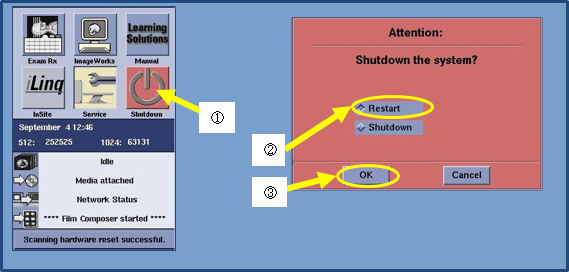
- Click ①SHUTDOWN from desktop selection
area and select ②Restart in Attention window
to prevent LB Tube Hot landing. Then press ③OK button. See following Illustration.
Figure 1. System Shutdown icon and Restart attention
- Click OK in Attention window.note:
Once system restart is completed, tube temperature is set to hot limit value. Cooling time to cold tube temperature limit value is approximately 110 minutes.
note:If this procedure has been done as part of Tube Replacement procedure, return to Tube replacement procedure for remaining steps
Finalization
Save System State.