- Topic ID: id_11038972
- Version: 2.0
- Date: Jan 30, 2019 9:42:23 PM
HOT ISO Alignment
Prerequisites
This procedure provides steps for HOT ISO Alignment.
Procedure
- Select the CALIBRATION tab in the Common Service Desktop.
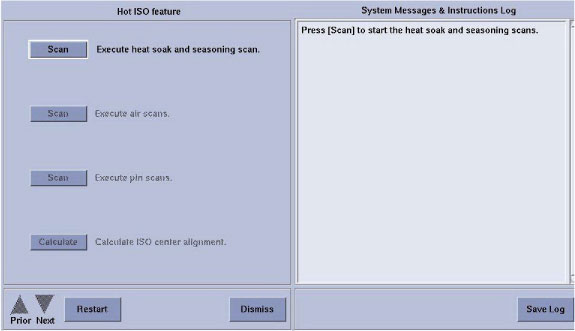
- Select HOT ISO ALIGNMENT. The Hot ISO
Screen appears as shown in Figure 1
Figure 1. Hot ISO Screen
- Remove any objects from the detector FOV. (Cradle, phantoms, Mylar window, etc.)
- Click the first Scan button to execute the Heat Soak and Seasoning scan.
- Press START on the GSCB when it flashes.
- Click the second Scan button to execute the Air Scans (small spot and large spot).
- Press START on the GSCB when it flashes.
- Place an 1/8 in. screwdriver on the phantom holder (should be pointing into the Z direction). Turn ON the laser alignment lights. Advance the adjust the table to position the metal shaft 35 mm up and 35 mm to the right of ISO center as marked by the laser alignment lights. Make sure the shaft remains perpendicular to the scan plane.
- Click the third Scan button to execute Pin Scans (small spot and large spot).
- Press START on the GSCB when it flashes.
- Click the Calculate button to calculate
correction factor. note:
No movement of the tube is required. This is a software correction done automatically.
Finalization
No finalization steps.