- Topic ID: id_11038943
- Version: 4.0
- Date: Nov 27, 2020 2:13:05 AM
Filter Assembly Replacement
Prerequisites
Conversion Factor: 1 ft-lb = 1.356 N-m
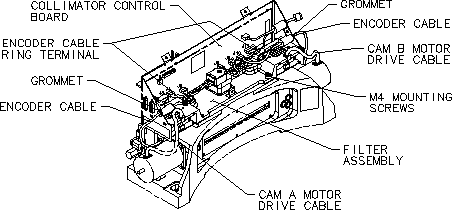
Figure 1. Filter Assembly Replacement
 |
|

note:
Please check the component P/N when replace the collimator related parts, should be ordered the same P/N according to the label on each component.
Procedure
- Remove gantry power. Ensure that all appropriate Lockout/Tagout procedures are followed.
- Remove the gantry side, top and front cover.
- Turn OFF all 3 switches (AXIAL DRIVE ENABLE, HVDC ENABLE, 120 VAC) on the Service Switch Panel (SSP).
- Position a drop cloth below the Collimator to collect any hardware that might be dropped.
- Follow the procedure for removing the Collimator Control Board.
- Follow the procedure for removing the Cam Motor Driver Modules.
- Remove driver covers on motor mount assembly and set aside.
- Remove the CAM A & B encoder cable ring terminals & washers.
- Return the screws & washers to their original location after removing the ring terminals.
- Slide the grommet on the CAM A & B encoder cables out of the frame mount to fully disconnect the encoder cables from the frame.
- Remove the Filter PWB Mount Bracket by removing the six pan head M4 mounting screws and set aside.
- Remove the four hex socket M4 frame mounting screws.note: Do not damage the fragile aluminum, graphite & copper filter assembly that extends into the Collimator frame during the Filter removal or new Filter installation.
- Lift the filter asm. from the steel Collimator frame and set to the side.
- Remove the new Filter Asm. from the shipping box.
- Seat the new Filter Asm. on the Collimator alignment pins.
- Place the old Filter Asm. in to the shipping box.
- On the new Filter Asm., insert the four hex socket M4 frame mounting screws and torque to 3 ± 0.3 N-m.
- Replace the Filter PWB Mount Bracket by installing all six pan head screws loosely, then tighten and torque to 3 ± 0.3 N-m.
- Follow the procedure for re-connecting the Cam Motor Driver Modules.
- Replace the driver covers on motor mount asm.
- Follow the procedure for re-connecting the Collimator Control Board.
- Remove the screw & washer for the ring terminals & use to secure the CAM A & B ring terminals & tighten.
- Replace the top cover of the Collimator using the five pan head
mounting screws with spring washers and tighten.note: Ensure the Cam Driver Leads are outside of the cover.
- Remove the drop cloth and follow the procedures for closing the gantry.
Finalization
- Perform Collimator Aperture Tests.
- Perform Collimator Functional Diagnostic Tests.note: Perform below procedures if there are artifact seen in the images.
- Perform Plane of Rotation (POR) Alignment.
- Perform Beam on Window (BOW) Alignment Process.
- Perform CBF/SAG Alignment Process.
- Perform ISO Alignment Process.
- Perform HOT ISO Alignment.
- Perform Collimator Calibration.
- Perform Detailed Calibration.
- Perform Fast Calibration.
- Perform System Scanning Test.
- Perform Quality Assurance Test.
- Perform Save System State.