- Topic ID: id_16157456
- Version: 1.0
- Date: Jul 7, 2018 4:37:58 PM
CTPM-1322 (Clean DAS, DUCT Fan Filters)
Prerequisites
Overview
Procedure Effectivity:
note:
This procedure is necessary to Maintain the cooling capacity of the SDAS.
Procedure
- Move the table to the lowest elevation.
 warning
- Turn off the facility power to PDU.
- Remove the Gantry side covers.
- Lift off the top cover.
- Remove the "scan" window.
- Remove the front cover.
- Rotate the Gantry until the DAS/DUCT Fan assembly is within serviceable reach.
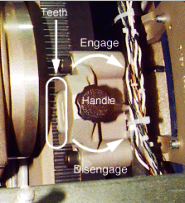
- Engage the rotational lock. See Figure 1.
Figure 1. Rotational Lock
- Disconnect the fan harness.
- notice
- Vacuum the dust from fan "finger" guards.
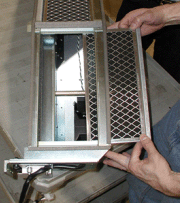
- Remove the filters from duct and vacuum dust from each filter. It is
normal for the right chassis filter to be more dusty. See Figure 2.note:
There are three filters in the DAS plenum.
Figure 2. DAS Plenum Removal
- Inspect the duct for dust, remove it, and clean it, if necessary.
- Replace the filter. Note the DIRECTION OF AIRFLOW stamped on filter frame. Filter foam faces towards the fan).
- Restore the fan harness connection.
- Reassemble the Gantry covers and the scan window.
- Restore the power.
 |
 |
Finalization
No finalization steps.