- Topic ID: id_16157488
- Version: 2.0
- Date: Nov 27, 2020 2:16:02 AM
Axial Drive Assembly Replacement
Prerequisites
Overview
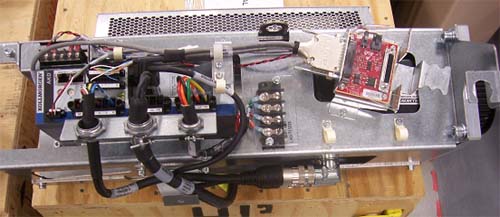
This demonstrates how to replace Danaher Axial Drive assembly.
Figure 1. Drive Assembly to be installed
1 Preparation for Replacement
Procedure
- notice
- Remove gantry right side cover and disable Axial drive, HVDC and 120 VAC service switches from the Service Switch Panel. For cover removal refer to Replacement > Gantry > Enclosure > Cover Removal Procedure.
- Perform all required LOTO activities to remove all power from the gantry.
- Remove the gantry left, top, front and rear covers. Connect the cover E-stop circuit to the terminators on the gantry.
- Disconnect all connections to the right options interface panel and remove the two bolts attaching the panel to the gantry, and remove the bottom gantry cover.
- Loosen the two front screws and remove the two rear screws of the gantry tilting bottom cover to allow removal of slip ring cover and drive pulley cover.
- Remove the right side tilting safety cover with a 5mm hex wrench for easier access to the drive module.
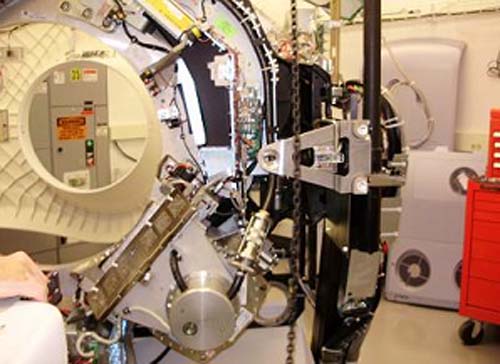
- Position gantry so that there are minimal obstructions from
the hoist setup to the drive/motor assembly position. See Figure 2.
Figure 2. Gantry Positioning
- Engage the rotating assembly indexer lock to prevent gantry rotation during this procedure.
- notice
- Remove the lower slip ring cover by loosening the captive screws.
 |
|
2 Removal of existing axial drive assembly
Procedure
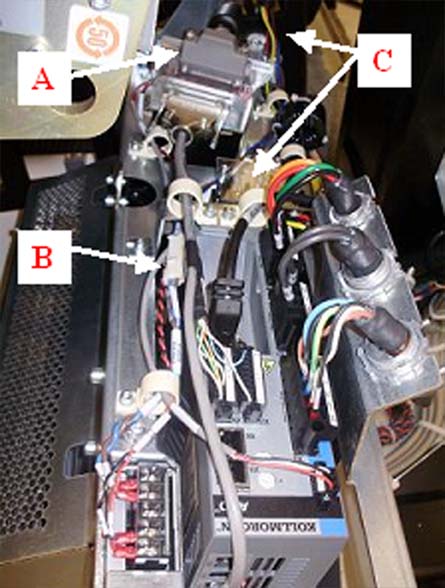
- Disconnect the axial power cable, holding brake cable and TGPU
cable from existing axial drive and pull excess wires through the
back of the frame. See Figure 3.note:
To disconnect the power cable ends from the terminal strip, removal of power strip cover is necessary.
Figure 3. Power cable, brake cable and TGPU cable to be disconnected.
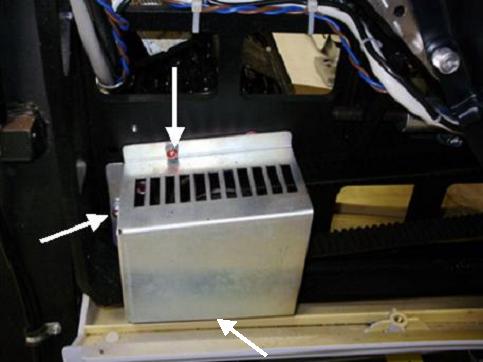
- Remove the drive gear cover by removing the two or three M6
hex screws, flat washers and washer locks. See Figure 4 below.
Figure 4. Gear Cover
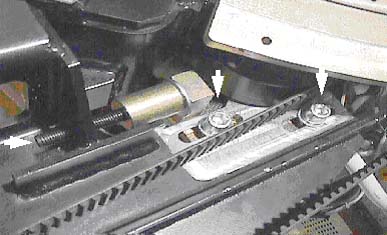
- Loosen the axial drive belt. Refer to Figure 5.
- Using a 10mm hex key, or hex bit socket, loosen the two mounting screws on the plate.
- Using a 6mm hex key, or hex bit socket with a 12-in. extenstion,
fully loosen the elongated hex screw to loosen the drive belt.
Figure 5. Threaded rod and 2 mounting screws
- Remove the drive belt from the drive gear. Take care to not disturb the teeth engagement along the rotating assembly.
- Assemble the gantry tube hoist frame and install hoist. Clip the end of the chain to the hoist ring on the axial drive to support the drive assembly (see Figure 7 for reference).
 warning
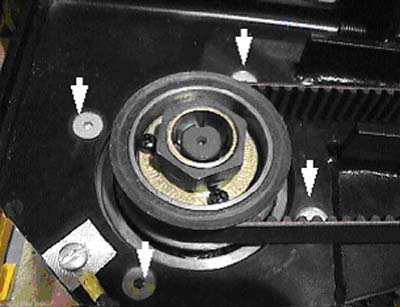
- Using a 7/32-in hex bit socket, remove the four (4) hex screws
mounting the motor to the gantry frame. See Figure 6.note:
Screws may be very tight, be careful when initially loosening motor mount screws.
Figure 6. Removing the four (4) hex screws will release motor.
- warning
- Guide the motor assembly out of the gantry and set aside. Leave the hoist assembly set up as it will be required for the installation of the new drive.
 |
|
3 Installing Axial Drive Assembly
Procedure
- Attach safety cover bracket and lower Cantrell bracket onto the new drive assembly.
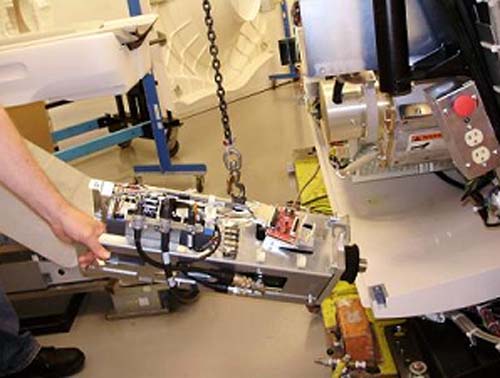
- Attach new drive assembly to the hoist via the hook on top of
the box. The drive will tilt downward on the motor end of the assembly
after lifting it off the ground. See Figure 7.
Figure 7. Mounting drive assembly to hoist
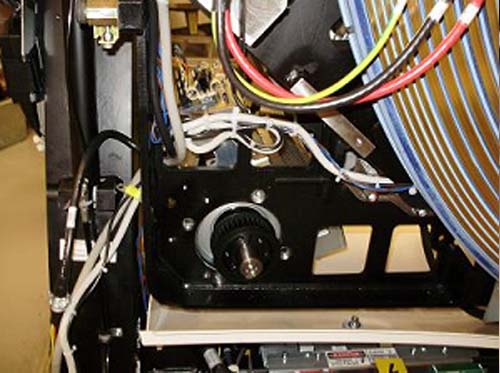
- Guide the drive into position and pivot so the drive is in correct
orientation with the frame. See Figure 8 below.
Figure 8. Guide drive into position
- Rest guide on hole in back frame, then position so bolt holes
line up. May have to pull back on drive slightly. Refer to Figure 9 below:
Figure 9. Pull back on motor hub to hold in place before bolting to frame.
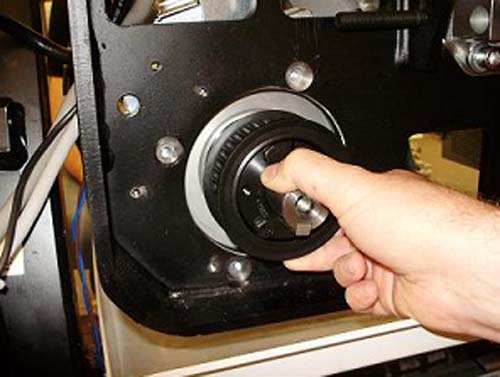
- Bolt motor to frame from the back. Torque according to table.
- Remove hoist once assembly is mounted. Attach Cantrell to Cantrell
bracket if not already attached.note:
When installing the covers at the end of this procedure, it may be necessary to adjust the Cantrell to fit properly onto the front cover bracket. This is possible by turning the threaded shaft at the bottom of the Cantrell.
4 Cable Installation and Routing
Procedure
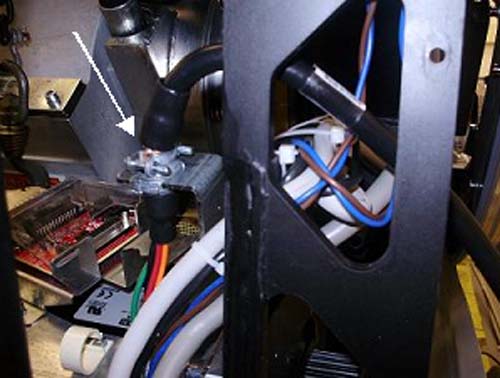
- Pull power cable through gantry frame above the motor mount.
Clamp cable in bulkhead. See Figure 10 below.
Figure 10. Routing of axial drive power cable
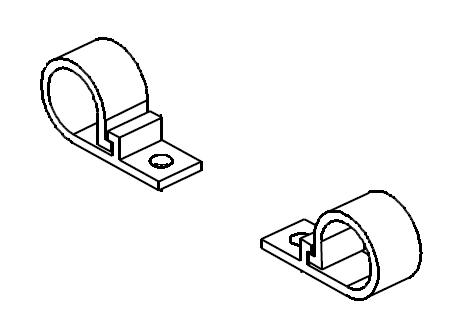
- Guide wire bundle through two plastic cable clamps toward terminal
strip. Refer to Figure 11 for visual reference of cable clamps.
Figure 11. plastic cable clamp diagram
- Remove the cover from the terminal strip.
- Loosen the screws on motor side of terminal strip with a flat head screwdriver.
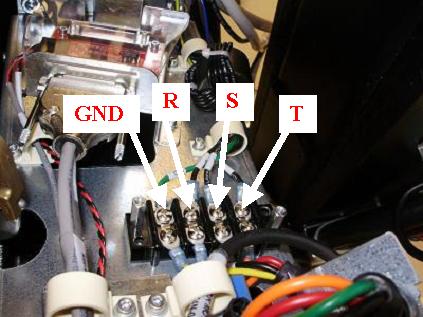
- Connect wires into terminal strip as follows (L to R): “GND”,
”R”, “S”, “T”. These should line
up with neighbor wires from the 2010 Axial Drive, and torque according
to table below. See Figure 12 for orientation of the wires.
Figure 12. Terminal strip connections
- Tighten screws and re-install cover.
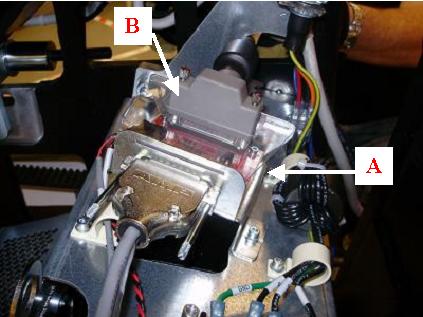
- Guide TGPU cable over bracket and connect to the back of the
KIM board assembly and tighten the two (2) Velcro straps around TGPU
cable and bracket. See illustration below.
Figure 13. Routing and connection of TGPU cable
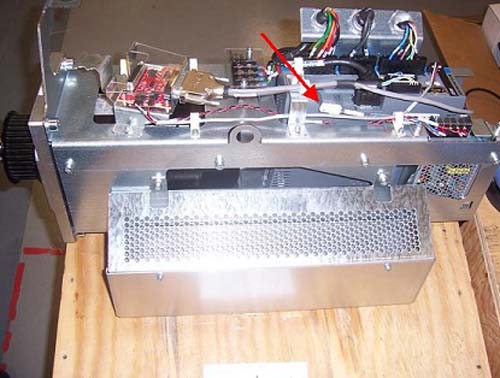
- Pull the holding brake wire (blue and brown) through and connect
to the power supply assembly. See Figure 14 below.
Figure 14. Connection of holding brake wire
- Replace belt around motor hub and tighten belt.
Refer to Align, Setup, Calibrations > Gantry > CT Belt Tension Check & Adjustment.
- Replace gear cover and torque according to Table below. See Figure 4 as a reference.
5 Re-Assemble of Gantry
Procedure
- Replace tilting bottom cover and tilting gantry safety cover.
- Remove LOTO to restore system power.
- Turn on the 120 VAC service switch from the Service Switch Panel.
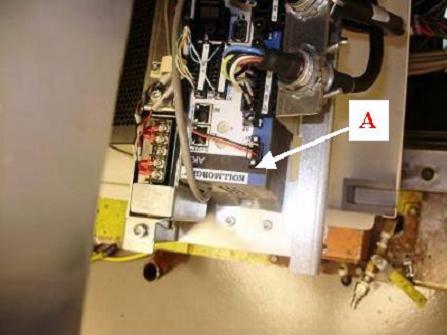
- When power is turned to ON, 3 code “n5”
“n0” “n2” should alternate display on the
axial drive window. See Figure 15 below:
Figure 15. Code Display
- Turn off the 120 VAC service switch from the Service Switch Panel.
- Re-install right side tilting gantry cover.
- Disengage rotating assembly lock and reassemble bottom cover, then install lower slip ring cover.
- Install the gantry front and rear covers, scan window, then the top and left side covers.
- Turn on the 120 VAC, Axial Drive, and HVDC service switches from the Service Switch Panel.
- Install the gantry right side cover.
6 Finalization
Procedure
- Perform a Fastcal from the Daily Prep button of the scan display.