- Topic ID: id_16157725
- Version: 1.0
- Date: Jul 7, 2018 4:31:15 PM
Magneto-Optical Disk
1 MOD Overview
Magneto-Optical Disks (MODs) labeled (formatted) for storing images have a DOS-like structure. MODs formatted for software have a UNIX structure. There are some DOS MODE commands in /usr/g/bin to help you view and copy files between the Image Archive media and the system. The size of DICOMDIR indicates how much space images are taking on the MOD. You must use Image Works to DETACH, then do another dmls in a shell to see an updated size.
dmls - list files of current directory
dmcd <path> - change to the directory identified by path
dmcat props - show content of the file props, which tells you the properties of that media
dmcat stat - show content of the file stat, which shows last time media was used
dmcpin -b <dosname><unixname> - copy file on media to the system
2 Sony SMO-F551-SD MOD Jumpers
2.1 GE Specific Jumper Settings
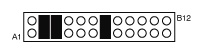
2.2 Jumper Descriptions
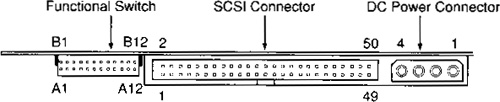
Figure 2. Sony SMO-F551-SD (MOD) connectors (rear view)