- Topic ID: task_fqd_blb_t3b
- Version: 3.0
- Date: Dec 29, 2020 1:01:12 AM
Creating Routing Table for RSvP Connectivity
Prerequisites
Overview
When a CT system is connected to GEHC back office using Insite2-RSvP and GEHC VPN (Proxy IP: 150.2.1.251 and Proxy Port: 8002), then the routing table must be setup in the scanner to establish the necessary route. This procedure explains how to set up such a routing table.
Procedure
- Open a Unix shell and become root by typing su - command at the command prompt followed by entering root password.
- Run command yast2.

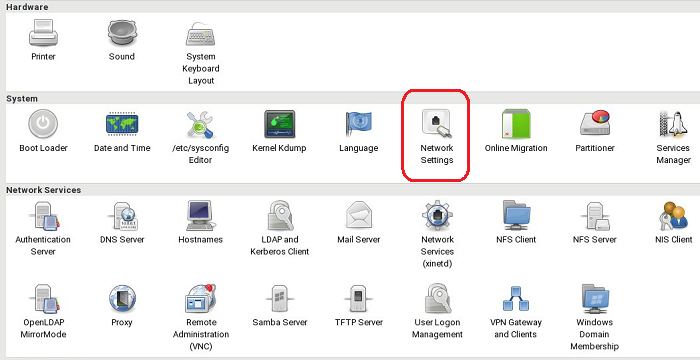
- Select Network Settings.
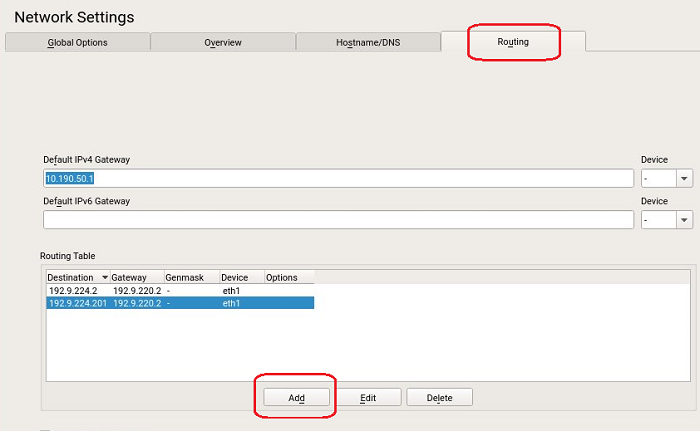
- Click Routing, then click Add.
- For Destination, input the RSvP Route IP 150.2.0.0 (based on region). For Gateway, input the Router IP, for example, 192.9.200.108, which is the IP allocated by Hospital for InSite router. Set Genmask to 255.255.0.0, Device to eth2, then click OK.
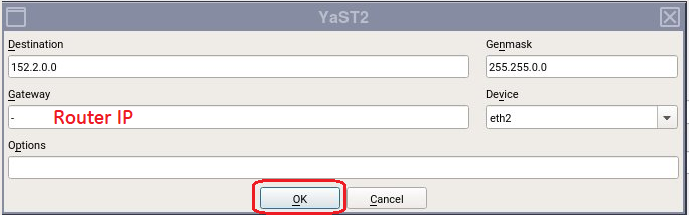 note: If there is a hospital network gateway before the InSite router, enter its address.
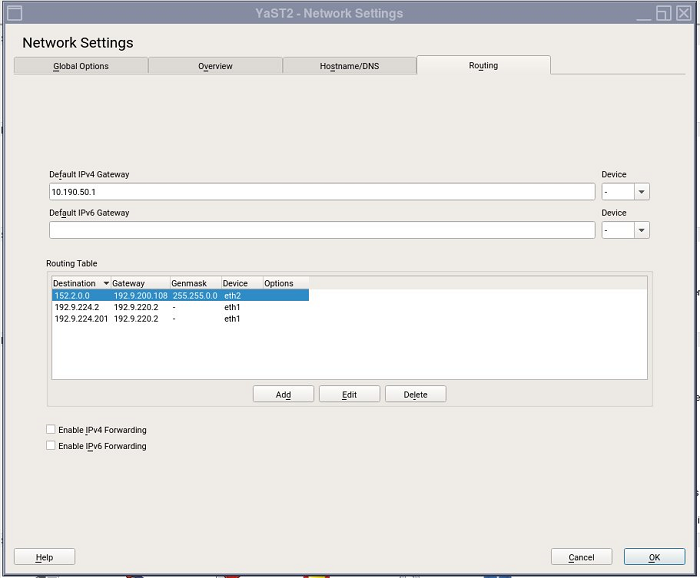
 - Click OK, and the final setting should be same as following, then reboot the Console.
Finalization
No finalization steps.