- Topic ID: id_15460649
- Version: 2.0
- Date: Nov 8, 2018 1:36:23 AM
Tube Warm Up and Fast Calibration
Prerequisites
Overview
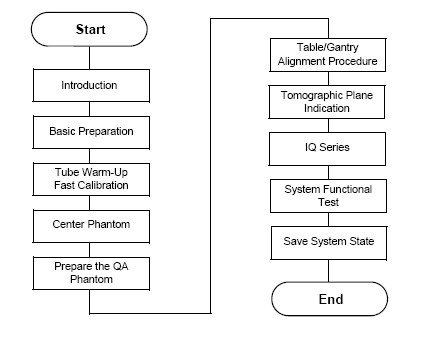
Figure 1. Image Quality Process Overview
1 Reference Procedure - Scanning w/Service Protocols
 |
|
This procedure is used to locate the Manufacturing and Installation protocols on the SERVICE tab.
Manufacturing and Service share this Protocol list. Different product option offerings also use this list. Carefully follow the scan section instructions and verify that you acquired the images with the correct technique before filling out the data sheet (Form F4879). Otherwise you may troubleshoot an image problem that only exists because you used the wrong technique.
Procedure
- Select the NEW PATIENT icon on the left monitor.
- Enter a Patient ID (e.g., getest) for easy identification.
- Click on the box labeled SERVICE to access the necessary protocols.
2 Tube Warm Up and Fast Cal
Procedure
- Select DAILY PREP and TUBE WARMUP. Follow the steps on screen until all scans are completed.
- Select FAST CALIBRATION from the Daily Prep menu.
Four basic steps will be performed: Gantry Balance Check, Mylar Window Check (Warm up scans if tube is cold), Interconnectivity Map Scan List, and Fast Cal Air Scans.
note:Use the default Fast Cal selections determined by the system configuration. (The system defaults to all four kV stations, but you can choose kV stations to calibrate during reconfig.)
- When the calibration process completes, click on QUIT.
Finalization
No finalization steps.