- Topic ID: id_26824541
- Version: 4.0
- Date: Aug 10, 2021 9:58:31 PM
Liquid Bearing Tube Rotor Control Tool
Prerequisites
Overview
The following procedure provides information on the Liquid Bearing (LB) Tube Rotor Control tool (also known as the rotor management tool) and how to stop and start the rotor.
 |
|
1 Tube type check
Procedure
- The system may have a Liquid Bearing tube. Refer to the Equipment Service - LB Tube Management procedure to check the tube type and to properly shutdown the rotor.
2 Using the tool
Procedure
- Install service key. note: Depending on the type of service key used, only certain function controls are available.
- Open the Common Service Desktop (CSD).
- Open a terminal and monitor the RTS Log Viewer for any errors.
- Select Diagnostics tab and then LB Tube Rotor Control.
Figure 1. LB Tube Rotor Control (rotor management tool)
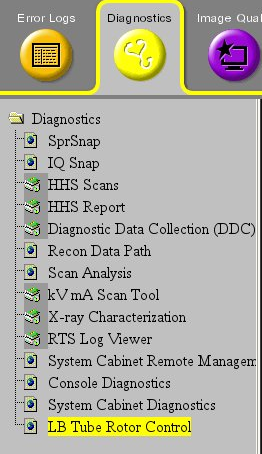
The GUI displays.
note: Depending on service key access level, rotor control selections will differ.Figure 2. LB Tube Rotor Control (rotor management tool)
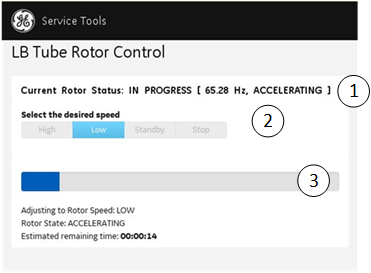
- To stop the rotor for system maintenance, select Stop and then Run. Monitor the tool for the update that states the rotor has stopped or is at 0 Hz.

 caution
note: Closing the LB Tube Rotor Control before verifying the rotor has stopped returns the rotor to an Idle state. - caution
- To start the rotor, open the LB Tube Rotor Control Tool (rotor management tool), select Idle, and then Run. Monitor the tool for the update that states the rotor has reached speed.
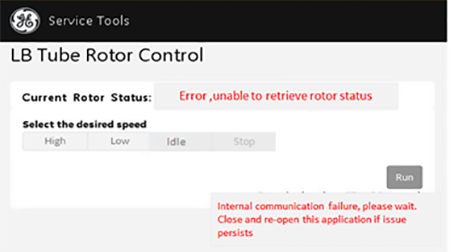
- If an error occurs, the tool returns to the default screen with all controls disabled.
Figure 3. Error notification
|
Finalization
If running this section as directed by another procedure, stop after this step and return to that procedure.