- Topic ID: id_15460471
- Version: 2.0
- Date: Nov 8, 2018 1:36:55 AM
Intercom Adjustment
Prerequisites
Overview
This procedure will enable you to perform the following-
-
Check intercom functionality
-
Adjust intercom board gain and sensitivity (if needed)
Note that two versions of the board are presented in this document. Follow the appropriate section for the board received.
1 Functional Check
Procedure
- At the console set the SCIM patient volume control to its midway point. You should not hear anything in the background when no one is speaking. If someone is talking at the gantry, the intercom should be activated.
- Next rotate the gantry at 0.35 sec (fastest gantry rotation speed) using a DDC (Diagnostic Data Collection) scan with no X-ray. The intercom system will come on briefly while the system is accelerating but should shut off once it reaches the 0.35 sec speed.
- Verify the system will come on when someone is laying on the table and speaking into the microphone while the system is rotating at 0.35 seconds.
- If steps 2 and 3 are working correctly and you can hear the patient clearly there is no need to make any adjustments. Go to Finalization.
- If the intercom system comes on but the volunteer is not heard clearly or the intercom comes on and stays on (or on/off intermittently) during gantry rotation proceed to the adjustment procedures.
2 Adjustment Procedures
2.1 Gantry Intercom Board 2320719
Gantry Intercom Board 2320719 comes with R19 preset to 5.5k ohm and R10 preset to 1.25k ohm. No adjustments are normally needed.
Procedure
- Access the Intercom Board as follows:
- Remove gantry right side cover
- Disable Gantry Axial drive, HVDC and 120 VAC from the service switch panel.
- Remove the cover of the Intercom Board (Figure 1) found next to the Service Switch panel, using the Intercom Board Replacement procedure as a reference.
Figure 1. Gantry Intercom Board Location
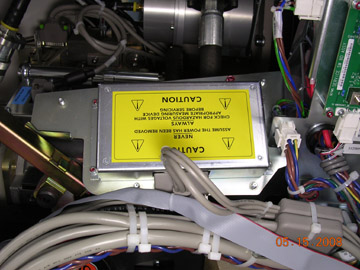
Figure 2. Gantry Intercom Board 2320719
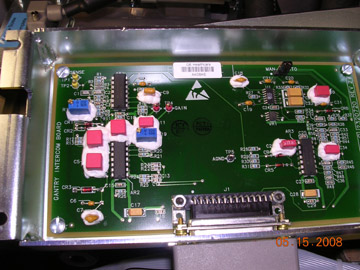
- Verify that the R19 and R10 values are set correctly by using
a multi-meter to measure test points TP1 & TP2 (yellow), for R10,
and TP3 & TP4 (red), for R19. The intercom board must be disconnected
from the system in order to properly measure these test points.
- If the intercom system comes on when the patient is talking but you are unable to hear the person clearly, adjust R19 on the intercom board. Increase the resistance by 1K at a time until you can hear the person clearly. This will increase the sensitivity of ALC also.
- If the system comes on and stays on or if it comes on and off intermittently when rotating at 0.35 seconds, adjust the R10 potentiometer on the intercom board in the gantry. Increase the resistance by 100 ohms at a time.
- Reconnect the intercom board, re-enable gantry power, and repeat the functional check section. Continue this process until the intercom system stays off when no one is talking, is activated when someone is speaking, and the patient can be heard clearly.
2.2 Gantry Intercom Board 5855007
Gantry Intercom Board 5855007 comes with R308 preset to 25K ohm and R307 preset to 10K ohm. No adjustments are normally needed.
Procedure
- Access the Intercom Board as follows:
- Remove gantry right side cover.
- Disable Gantry Axial drive, HVDC, and 120 VAC.
- Remove the cover of the Intercom board (Figure 1) found next to the Service Switch panel, using Intercom Board Replacement as a reference.
Figure 3. Gantry Intercom Board 5855007
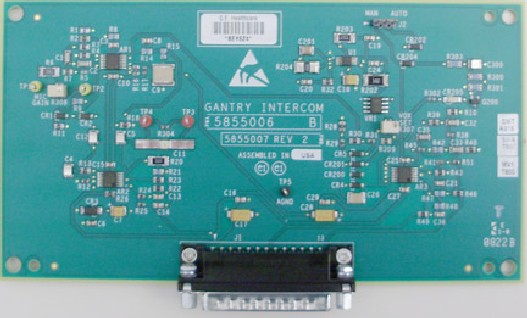
- Verify that the R308 and R307 values are set correctly (within
100ohms) by using a multi-meter to measure test points TP1 & TP2
(yellow), for R308, and between the point R309 and R307 and ground
for R307.The intercom board must be disconnected from the system in
order to properly measure these points.
- If the system comes on and stays on or if it comes on and off
intermittently when rotating at 0.5 seconds, adjust the R308 potentiometer
on the intercom board in the gantry. Increase the resistance by 1-2K
ohms at a time. This will increase the sensitivity of ALC also.note:
The red LED illuminating indicates that the system is on. This will assist in verifying when the system turns on and off.
- If, when the system is off, there is too much noise coming through the speaker at the console, adjust the R307 potentiometer on the intercom board in the gantry. Decrease the resistance by 1-2K at a time until desired volume level is reached.
- If the system comes on and stays on or if it comes on and off
intermittently when rotating at 0.5 seconds, adjust the R308 potentiometer
on the intercom board in the gantry. Increase the resistance by 1-2K
ohms at a time. This will increase the sensitivity of ALC also.
- Reconnect the intercom board, re-enable gantry power, and repeat the functional check section. Continue this process until the intercom system stays off when no one is talking, is activated when someone is speaking, and the patient can be heard clearly.
3 Finalization
Procedure
- Replace intercom board cover if previously removed.
- Turn on any gantry service switches previously turned off.
- Replace Gantry side cover.