- Topic ID: id_15460163
- Version: 3.0
- Date: Jan 20, 2020 8:36:14 PM
How to Setup Low Signal correction for SmartPrep
Prerequisites
Overview
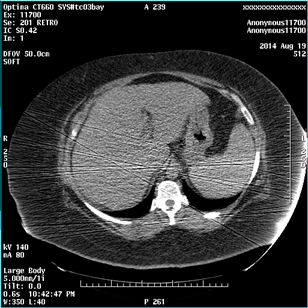
On LightSpeed VCT with 11HW12.5, 12HW14.6, 13HW31.8 and Optima CT660 with 12HW28.8, there is a possibility to have streak artifact on monitoring phase images of the SmartPrep in case of DAS count/signal is low.
This procedure describes how to set up low signal correction for the SmartPrep monitoring phase images.
Figure 1. A Sample Image
1 For LightSpeed VCT with 11HW12.5 and 12HW14.6
Application software should be in shutdown.
Procedure
- Open a Unix shell, and type the following.
- cd/usr/g/config ENTER
- cp prep_flags.cfg.vct prep_flags.cfg.vct.org ENTER
- chmod +w prep_flags.cfg.vct ENTER
- nedit prep_flags.cfg.vct ENTER
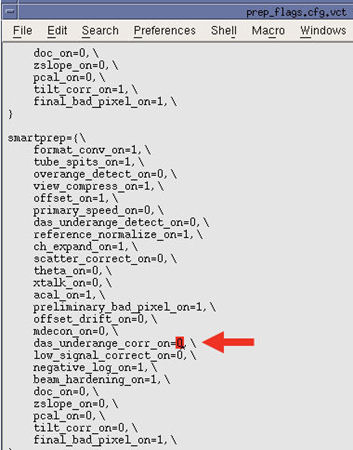
- Change the value of the following line to 1.
(das_underange_corr_on=0 → das_underange_corr_on=1)
Figure 2. nedit Window
- Click File, and click SAVE, then select Exit to close the window.
2 For LightSpeed VCT with 13HW31.8 and Optima CT660 with 12HW28.8
Application software should be in shutdown.
note:
In case of Optima CT660 with 12Hw28.8, the file name is prep_flags.cfg.cj64.
Procedure
- Open a Unix shell, and type the following.
- cd/usr/g/config ENTER
- cp prep_flags.cfg.vct prep_flags.cfg.org ENTER
- chmod +w prep_flags.cfg.vct ENTER
- xedit prep_flags.cfg.vct ENTER
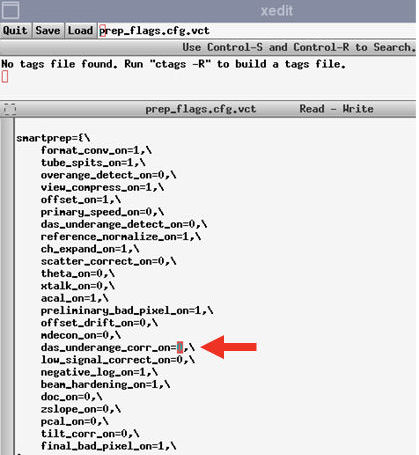
- Change the value of the following line to 1.
(das_underange_corr_on=0 → das_underange_corr_on=1)
Figure 3. xedit Window
- Click SAVE, and select Quit to close the window.
3 Finalization
No finalization steps.