- Topic ID: id_15460527
- Version: 2.0
- Date: Nov 8, 2018 1:37:55 AM
Host Computer NIC Exchange-HP Z400
Prerequisites
Overview
The System Option Licenses are tied to the Host Computer Ethernet (eth0) MAC address. The NIC card can be exchanged, if one is reasonably certain that the Host Computer failure is not related to the NIC card. This will allow for the reuse of System Option Licenses, otherwise new Licenses must be obtained.
This procedure describes and illustrates the steps necessary to exchange (transfer) the NIC Card from an existing HP Z400 Host Computer to a new HP Z400 Host Computer.
This procedure is used in conjunction with the GOC6.5 Host Computer Replacement Procedure.
Procedure
- Open the original Host Computer Side Cover.note:
The System Option Licenses are tied to the Host Computer Ethernet (eth0) MAC Address. The NIC cards (Slot 3) can be exchanged, if one is reasonably certain that the Host Computer failure is not related to the NIC card. This will allow for the reuse of System Option Licenses, otherwise new Licenses must be obtained.
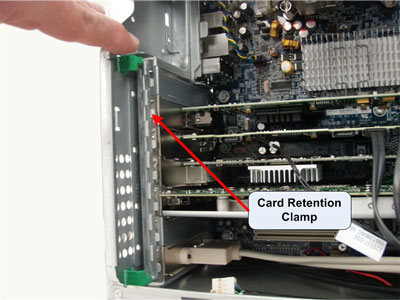
- Unlatch the Retention Clamp that holds the Expansion Cards in
place.
Figure 1. Expansion Card Retention Clamp Removal
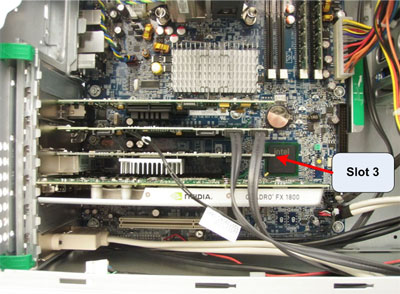
- Remove the NIC from Slot 3, set aside.
Figure 2. NIC Card (Slot 3) Removal
- Open the replacement Host Computer Side Cover.
- Unlatch the Retention Clamp that holds the Expansion Cards in place.
- Remove the NIC Card from Slot 3 and install the original Host Computer NIC Card set aside earlier.
- Install the NIC Card removed from the replacement Host Computer into the old Host Computer.
- Re-latch the Expansion Card Retention Clamps in both Host Computers
- Replace the Side Covers on the Host computers.note:
IN ORDER TO MEET EMC REQUIREMENTS, THE CHASSIS COVER MUST BE PROPERLY INSTALLED AFTER SERVICING. CHECK THAT THE COVERS AND RETENTION CLAMPS ARE MOUNTED FIRMLY IN PLACE AND LOCKED DOWN WHERE APPLICABLE.
Finalization
No finalization steps.