- Topic ID: id_15460460
- Version: 2.0
- Date: Nov 8, 2018 1:38:27 AM
Heat Exchanger Filter Replacement
Prerequisites
Overview
This procedure shows how to replace the filter.
Procedure
- Remove side, top, and front gantry covers.
- Turn OFF service switches on the Service Switch Panel (AXIAL DRIVE ENABLE, HVDC ENABLE, 120VAC).
- Rotate gantry so that Heat Exchanger is at the 2 O'Clock position (tube at or just below 3 o'clock).
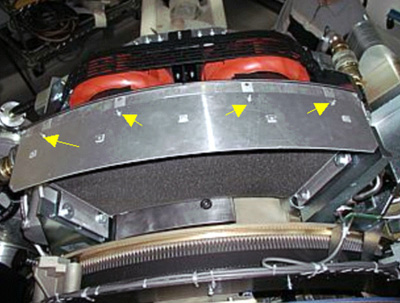
- Remove the screws holding the filter in place. (See Figure 1.)
Figure 1. Screw Locations
- Remove filter by lifting straight up and out.note:
Inspect filter and frame where filter resides, if not excessively soiled the filter can be cleaned with a vacuum.
- Install filter. Be sure the lower edge of the filter engages the tabs on the heat exchanger frame.
- Replace the screws holding the filter.
- Switch ON service switches on the Service Switch Panel (AXIAL DRIVE ENABLE, HVDC ENABLE, 120VAC).
- Replace all covers on the gantry.
Finalization
- Perform System Scanning Test.