- Topic ID: id_15460695
- Version: 2.0
- Date: Nov 8, 2018 1:39:36 AM
HP xw8400 Memory Module Replacement
Prerequisites
Overview
This procedure describes the steps necessary to perform HP xw8400 Memory Module replacement. For preliminary requirements and finalization steps see HP xw8400 Lower Level FRU Replacement.
xw8400 Memory Features:
-
8 memory slots for DIMMS
-
1-GB, 2-GB and 4-GB pairs
-
64 GB maximum configuration
-
Supports single-channel or dual-channel DIMMs
-
Supports DDR2-667
-
No support for mirroring, no spare DIMM support
-
Standard ECC (72-bit ECC)
1 Memory Module Removal
Procedure
- Lay the Host Computer on its side with the system board facing up.
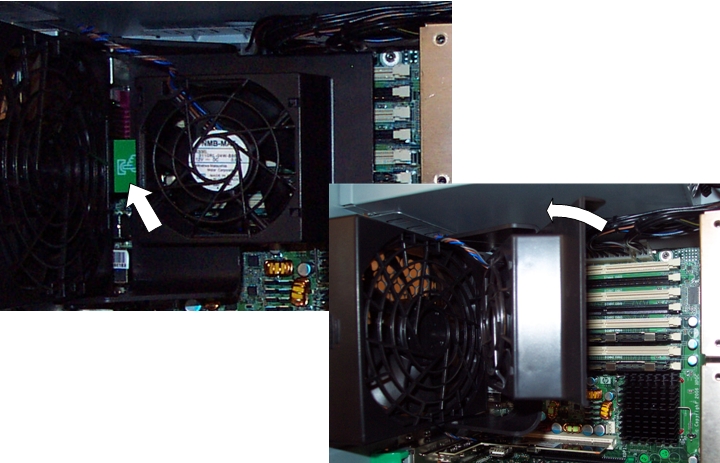
- Release and hinge away the Memory Module Cooling Fan. The cooling
fan can be released by pressing the green tab on the left side of
the fan.
Figure 1. Memory Module Cooling Fan
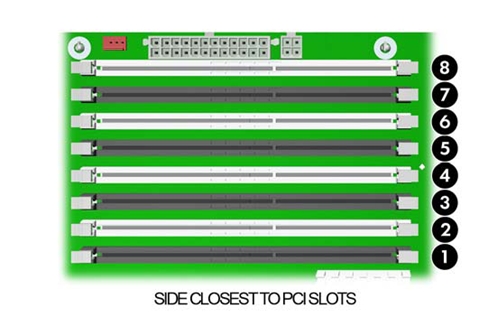
- Identify the slot location that contains the suspected faulty
memory module.
Figure 2. Memory Module Slot Locations
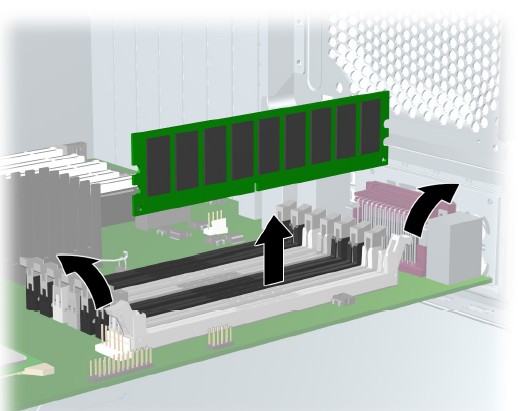
- Gently push outwards on the socket levers on the slot that contains the suspected faulty memory module.
- Lift the DIMM straight up and remove it from the unit.
Figure 3. Memory Module Removal
 note:
note:DIMMs and the DIMM sockets are keyed for proper installation. Be sure these guides line up when installing a DIMM.
2 Memory Module Installation Considerations
To install a memory module, reverse the previous sequence and insert memory module in slot where faulty memory module was removed. Be aware of the following considerations:
-
Memory modules must be loaded in valid configurations. (See Figure 2 for identifying slot locations.)
-
If loading only one DIMM, install it in slot 1. Otherwise, DIMMs must be loaded as matched pairs.
-
If loading two DIMMs, install them in slots 1 and 3.
-
If loading four DIMMs, install them in slots 1, 3, 5, and 7.
-
If loading six DIMMs, install them in slots 1 through 5, and 7.
-
If loading eight DIMMs, install them in all slots.
-
Load the memory module pairs in order of size, from smallest to largest.
note:The BIOS generates warnings/errors on invalid memory configurations.
-
If there is no way to obtain a valid memory configuration by disabling some of the plugged-in memory, the BIOS will halt with a diagnostics 2006 code for memory error (five beeps and blinks).
-
If the BIOS can find a valid memory configuration by disabling some of the plugged-in memory, it will do so and report a warning during POST (“215-mismatched memory”). The system can still be booted in this condition.
Return to the HP xw8400 Lower Level FRU Replacement procedure.
3 Finalization
No finalization steps.