- Topic ID: id_15460913
- Version: 2.0
- Date: Nov 8, 2018 1:39:36 AM
HP xw8000 Series CMOS Battery Replacement
Prerequisites
Overview
This procedure describes the steps necessary to perform HP Computer CMOS Battery replacement. For preliminary requirements and finalization steps see the prescribed Lower Level FRU Replacement procedure for the specific model of HP computer. See Replacement Procedure chapter of the System Service Manual.
1 Workstation Service Preparation
Perform the following steps before servicing the workstation.
Procedure
- Remove/disengage any security devices that prohibit opening the workstation.
- Disconnect all peripheral device cables from the workstation.
2 Battery Removal/Installation
Procedure
- Remove workstation access panel cover.
- Lay the workstation on its side with the system board facing up.
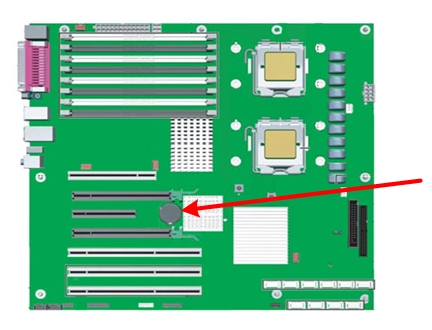
- Locate the battery on the HP computer’s systemboard. Reference
the following illustrations for the different HP computer models.
Figure 1. HP xw8000 Battery Location
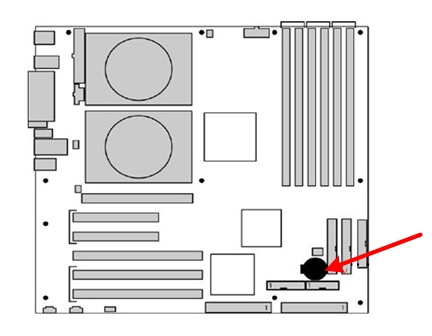
Figure 2. HP xw8200 Battery Location
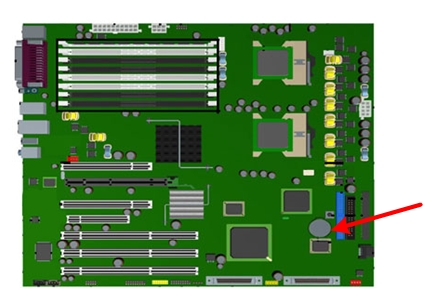
Figure 3. HP xw8400 Battery Location
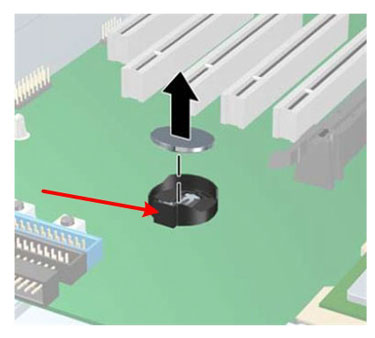
- Remove the old battery. Release the battery from its holder
by pulling back on the spring clip (shown at arrow).
Figure 4. Battery Removal
- Let the computer sit for 2-3 minutes to allow for the CMOS memory to clear.
- Install the new battery. Make certain the spring clip snaps over the battery, holding it in place. The battery’s positive (+) side should be facing upwards.
- Reinstall access panel on the workstation.
- Reinstall the HP computer in Operator Console and power on the operator console. Follow the prescribed Lower Level FRU Replacement procedure for the specific model of HP computer. See Replacement Procedure chapter of the System Service Manual.
- During power up press F10 as soon as the display is active, the word Setup will appear in the lower right corner of the screen.
- Restore customized BIOS Settings for the specific HP computer following these procedures:
- Make certain to save BIOS Settings and exit.
- Return to respective Lower Level FRU Replacement procedure.
3 Finalization
No finalization steps.