- Topic ID: id_15460858
- Version: 5.0
- Date: May 9, 2022 11:45:19 PM
GTCB Replacement
Prerequisites
Overview
This procedure covers replacement for both GTCB and GTCB2. Replacement for GTCB2 is the same as GTCB.
Procedure
- Raise the Table to maximum height.
- Move the Cradle and IMS to OUT limit position.
- Remove power from Table by turning off 120VAC, Axial Drive and HVDC switches on Service Switch Panel.
- Remove the Front Base Cover.
- Disconnect all cable connector from the GTCB Assy.
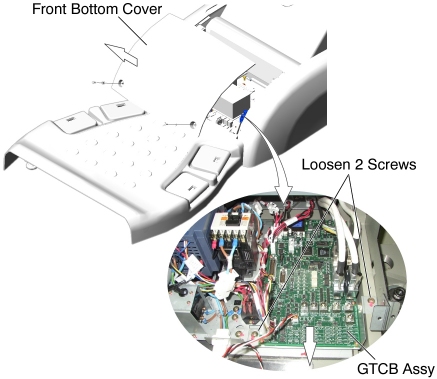
- Loosen 2 screws, and slide GTCB Assy with the bracket toward the Gantry, then remove it from the Table.
- Remove the existing GTCB Assy from the bracket, and attach the
new GTCB Assy to the bracket.
Figure 1. GTCB Assy Removal
- Install the new GTCB Assy with bracket in place, and tighten the 2 screws.
- Re-connect all cable connectors to the GTCB Assy.
Finalization
- Power up the Table from the Service Switch Panel.
- Perform the following:
Flash download
note: This note is only applicable for GT2000x. Please ignore the Table Type Mismatch error during Flash download if the actual Table type on the system is “2000X”(GT_LONG_675). After Table Cradle Characterization is completed, this error will be gone.Table Characterization
Mechanical Characterization
Elevation Inching Adjustment
- Turn off all 3 switches (Axial Drive, HVDC, 120VAC), and re-install the Table Covers.