• Topic ID: id_15460111
  • Version: 2.0
  • Date: Nov 8, 2018 1:37:52 AM

GSCB Power Module Replacement

Prerequisites

Overview

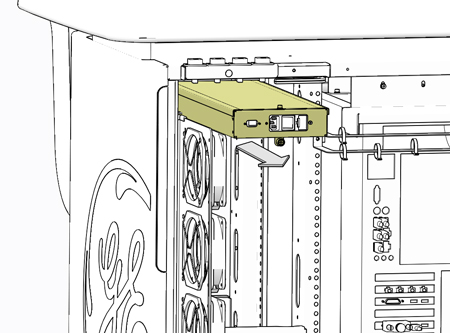
This procedure shall be followed when replacing the GSCB Power Module in the GOC6.6 VCT console.

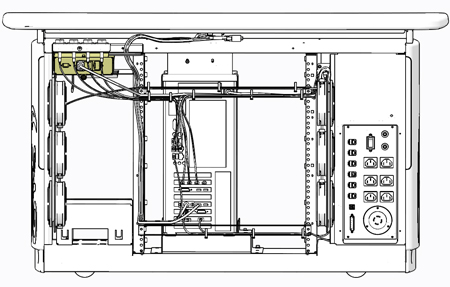
Figure 1. GSCB Power Module Location

1 GSCB Power Module Removal

Procedure

  1. Select one of the following methods to Power OFF the Console:
    1. If Applications are up, click on the Shut Down button on desktop display and select Shutdown.
    2. If Applications are down, open a Terminal Window. Type: halt , then press Enter.

  2. When halt command has finished, power Off the console at the front panel switch.
  3. Apply LOTO for console. For procedures, see Equipment Service - Lockout-Tagout-PPE.
  4. Remove the console rear chassis cover.

    Refer to Replacement > Console (GOC6.6) > Console Cover Removal and Installation Procedure .

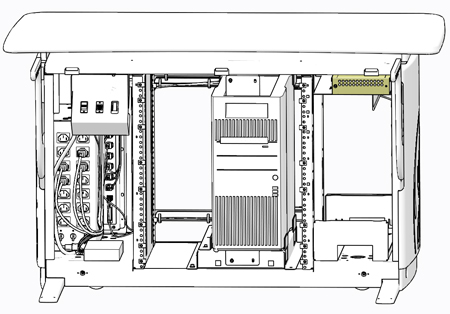
  5. Locate the GSCB Power Module in the upper left corner of the GOC6.6 console looking from the rear of the console.

    Figure 2. GSCB Power Module Location – Console Rear View

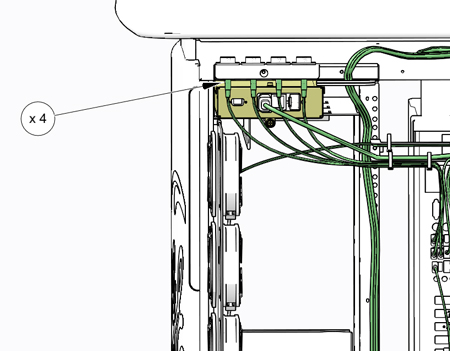
  6. Disconnect the four (4) USB cables from the Upper Bulkhead panel, these cables will interfere with the power module removal. Make certain the cables are clearly labelled.

    Figure 3. USB Cables – Upper Bulkhead panel

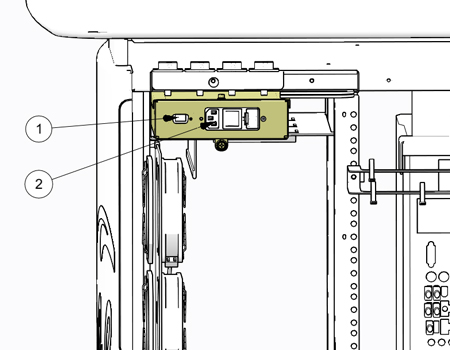
  7. Disconnect the AC and DC Power cables from the GSCB Power Module.

    Figure 4. GSCB Power Module Connections

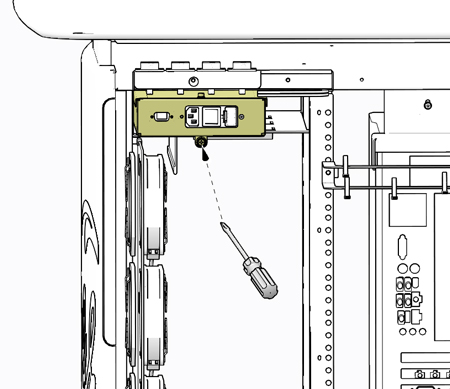
  8. Unscrew the Phillips captive thumb screw to unfasten the power module.

    Figure 5. GSCB Power Module Fastening Removal

  9. Slide the GSCB Power Module out the back side of the console and set aside.

    Figure 6. GSCB Power Module Removal

2 GSCB Power Module Install

Procedure

  1. Slide the replacement GSCB Power Module into console and fasten the captive Phillips screw.
  2. Reconnect all cables removed earlier, including the four (4) USB cables removed from the Upper Bulkhead panel.
  3. Remove LOTO on console. For procedures, see Equipment Service - Lockout-Tagout-PPE.

3 Functional Checks, Alignments and Setups

Procedure

  1. Power On console.
  2. Confirm proper operation of the GSCB. Reference GSCB and ICOM Functional Checks procedure.

4 Finalization

Procedure

  1. Install console rear cover. Refer to Replacement > Console (GOC6.6) > Console Cover Removal and Installation Procedure.
  2. Perform the Functional Checks > System Scanning Test instructions from the procedure list.
  3. Perform the Functional Checks > Quality Assurance Test instructions from the procedure list.