- Topic ID: id_15460130
- Version: 4.0
- Date: Jan 20, 2020 8:36:10 PM
GSCB Configuration and Intercom Setup
Prerequisites
Overview
Figure 1. GSCB Assembly
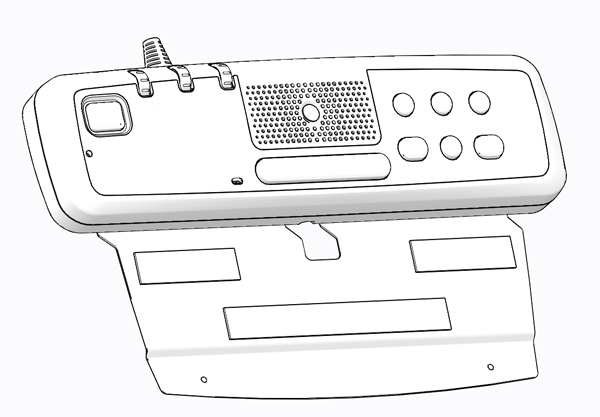
1 GSCB Service Access Panel
Procedure
- To gain access to the GSCB Assembly’s configuration and
adjustment switches, flip the GSCB assembly over to view the backside.
Figure 2. GSCB Service Access Panel – Back side
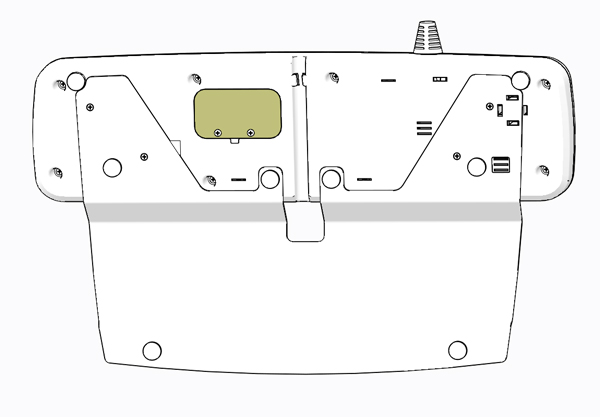
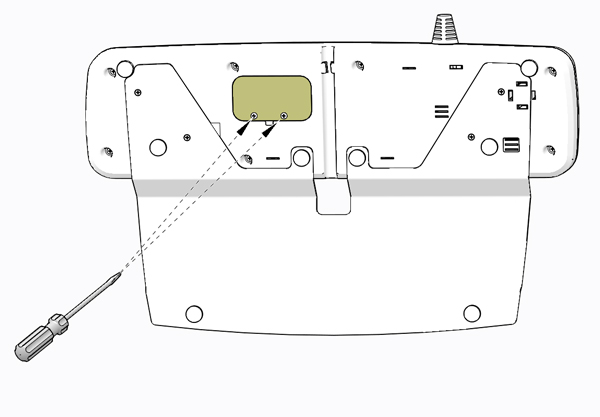
- Remove the two (2) Phillips screws holding the access panel
in place and set aside.
Figure 3. GSCB Service Access Panel Screw Removal
- Flip the Service Access Panel up and set it aside to expose
the GSCB configuration and setting switches.
Figure 4. GSCB Service Access Panel Removal
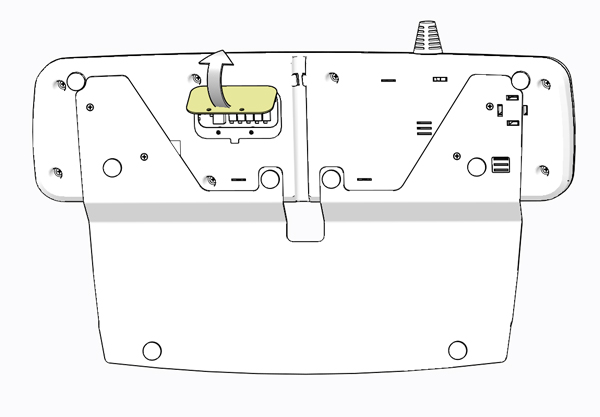
Figure 5. GSCB Service Access Panel Removed
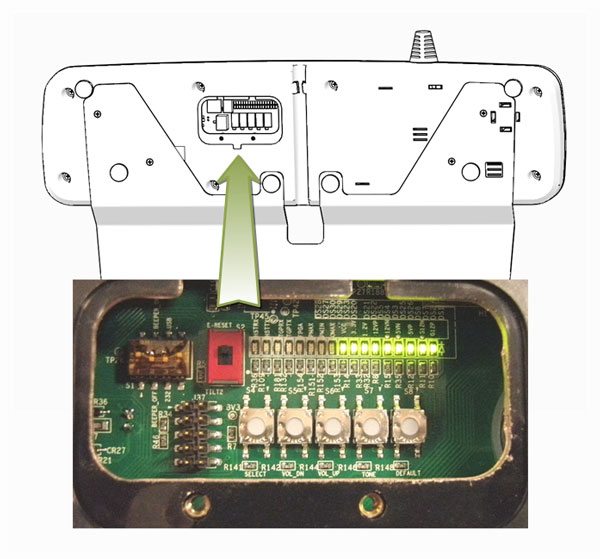
2 GSCB Configuration
Figure 6. GSCB Switches and LEDs
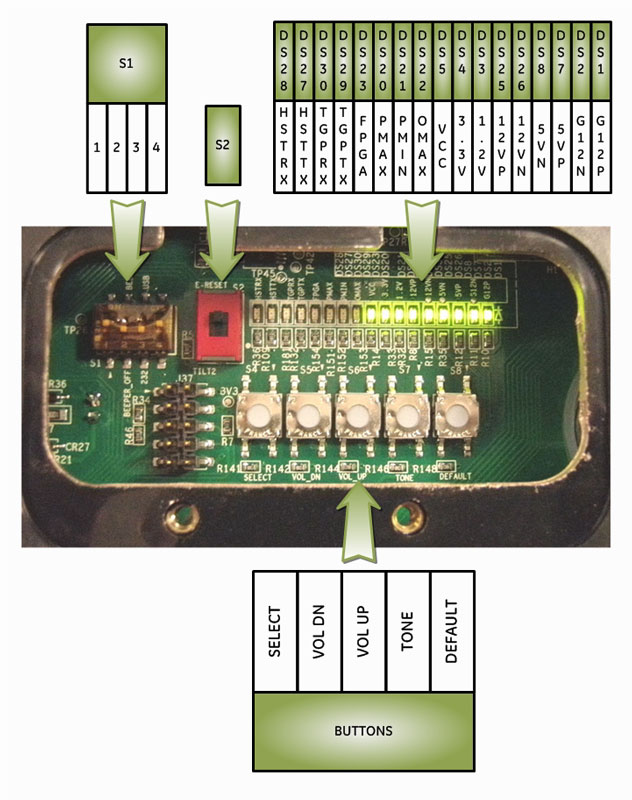
Procedure
- Configure Switch 1 to the following positions.
- Configure Switch 2 to the following position.
3 GSCB Intercom Setup
Figure 7. GSCB Switches and LEDs
When adjusting the GSCB Intercom Volume Adjustments described below, please note:
Service Mode: TONE
-
When in Service Mode (TONE button pressed once), the Operator Volume controls (External Dials) are no longer functional. The GSCB is setting the minimum and maximum levels for these external dials. When first entering service mode, PMAX, PMIN, and OMAX LEDs will flash On and Off (on for 2 seconds, then off).
-
Patient Speaker (gantry speaker) or Operator Speaker (GSCB speaker) will omit a constant tone depending on which volume adjust mode is selected.
-
When the Service Mode TONE button is pressed a second time, the GSCB will exit Service (adjustment) Mode.
Volume Adjust: VOL UP / VOL DN
-
If the volume is adjusted to max or min value while pressing VOL UP key or VOL DN keys, PMAX, PMIN, or OMAX LED will flash @2Hz continuously, and no further adjustment (increase/decrease) is possible.
-
One must exit Service Mode then enter Service Mode to regain adjustment capability.
Default: DEFAULT
-
While in Service Mode, pressing DEFAULT button will cause Operator Speaker (GSCB speaker) MAX volume and Patient Speaker (Gantry speaker) MAX/MIN volume adjustments return to factory (pre-setted) values.
-
Observe all 3 service LEDs ( PMAX, PMIN, and OMAX ) flash @ 2Hz last for 3s.
Procedure
- Enter Service Mode and selecting Volume Adjustments ( PMAX, PMIN, or OMAX ):
- Remove service window cover at the back of GSCB and press TONE button once to enter service mode.
- Press SELECT button.
The SELECT button selects which of the three (3) volume adjustments (PMAX > PMIN > OMAX) is enabled with each press of the SELECT button in sequence.
PMAX, PMIN, or OMAX LED will be turned On (no flashing) when selected, and that respective volume may be adjusted.
- Patient Speaker Minimum Volume adjustment, PMIN LED on. Shall hear test tone in scan room coming from gantry speaker.
- Select PMIN using SELECT button.
- Press VOL UP key or VOL DN key to adjust minimum tone volume in scan room.
- Adjust Patient Volume minimum level so that the tone is just
heard above the room noise.
- Patient Speaker Maximum Volume adjustment, PMAX LED on. Shall hear test tone in scan room coming from gantry speaker.
- Select PMAX using SELECT button.
- Press VOL UP key or VOL DN key to adjust maximum tone volume in scan room.
- Adjust Patient Volume maximum level so that the tone is heard
at a maximum undistorted level.
- Operator Speaker Maximum Volume adjustment, OMAX LED on. Shall hear test tone in operator room coming from GSCB speaker.
- Select OMAX using SELECT button.
- Press VOL UP key or VOL DN key to adjust maximum tone volume in operator room.
- Adjust Operator Speaker maximum volume level so that the tone is heard at a maximum undistorted level.
- Exit Service Mode, Press TONE button.
- Using the external volume controls (dials) on the GSCB:
-
Adjust AutoVoice volume such that one can comfortably hear the AutoVoice commands in the scan room.
-
Adjust Operator to Patient volume such that one can comfortably hear the Operator in the scan room.
-
Adjust Patient to Operator volume such that one can comfortably hear the Patient in the operator room.
-
4 Finalization
Procedure
- Replace the GSCB Service Access Panel using the two (2) screws removed earlier.
- Perform the instructions from the procedure list.
- Perform the instructions from the procedure list.