- Topic ID: id_15460101
- Version: 3.0
- Date: Jun 15, 2020 11:00:26 PM
GOC6.6 VCT Host Computer (Z820) FDIP Card Replacement
Prerequisites
Overview
This procedure shall be followed when replacing the FDIP Card in the GOC6.6 VCT host computer (Z820).
1 Z820 Computer Removal
Procedure
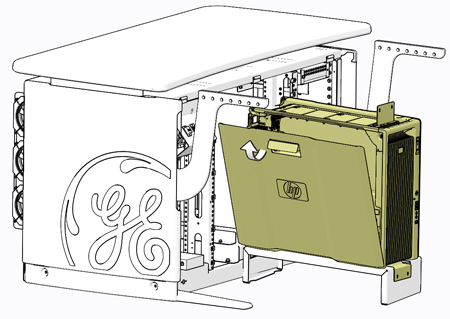
- Open the Z820 computer side access panel.
Figure 1. Z820 Side Access Panel Removal
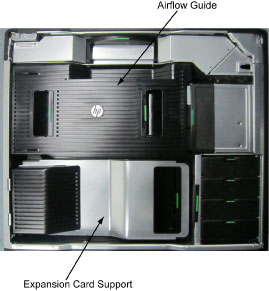
- Remove the Expansion Card Support.
Figure 2. Z820 Airflow Guide and Expansion Card Support
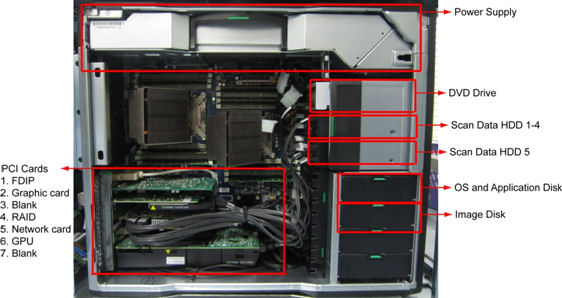
- Replace the existing FDIP card with new one.
Figure 3. Z820 Component Location
- Install the Expansion Card Support and close the Side Access Panel.
2 Restore the Console
Procedure
- Fully slide the Z820 computer back into the console chassis, until mounting brackets are flush against the console chassis.
- Remove and store the Service Platform.
- Install and torque the four (4) 3mm socket cap screws that mount
the Z820 computer in the GOC6.6 console.note:
Torque each the for (4) 3mm socket cap mounting screws to:
- Reconnect all cables removed earlier to the Z820 computer.
- Remove LOTO on console.
3 Finalization
Procedure
- Install console covers and Keyboard Tabletop assembly. Refer to Replacement → Console (GOC6.6) → Console Cover Removal and Installation Procedure.
- Perform the Functional Checks → System Scanning Test instructions from the procedure list.