- Topic ID: id_15460109
- Version: 2.0
- Date: Nov 8, 2018 1:37:50 AM
DVD Peripheral Tower Replacement (Single Bay)
Prerequisites
Overview
This procedure shall be followed when replacing
the Peripheral Media Tower (PMT) in the GOC6.6 VCT console.
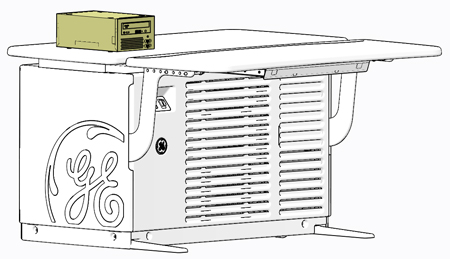
Figure 1. PMT (Single Bay)
1 PMT Removal
Procedure
- Select one of the following methods to Power OFF the Console:
- If Applications are up, click on the Shut Down button on desktop display and select Shutdown.
- If Applications are down, open a Terminal Window. Type: halt , then press Enter.
- When halt command has finished, power Off the console at the front panel switch.
- Apply LOTO for console. For procedures, see Equipment Service - Lockout-Tagout-PPE.
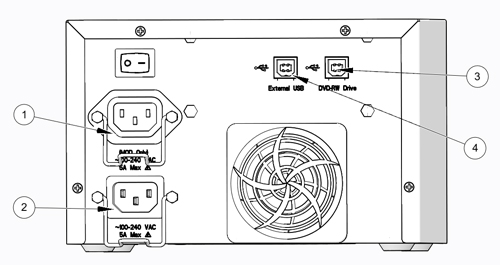
- Disconnect cables on the rear of the PMT assembly. Make certain
these cables are clearly labeled.
Figure 2. PMT Connections
- Remove the original PMT from GOC6.6 console and set aside.
2 PMT Install
Procedure
- Place replacement PMT on GOC6.6 VCT console.
- Reconnect all cables removed earlier.
- Remove LOTO on console. For procedures, see Equipment Service - Lockout-Tagout-PPE.
3 Functional Checks, Alignments and Setups
Procedure
- Power On console.
- Confirm that the power switch on the rear of the PMT assembly is turned on.
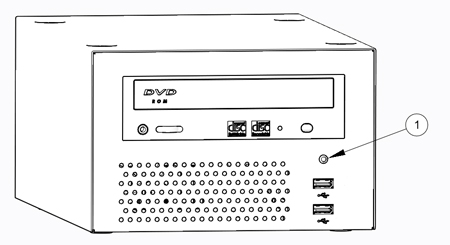
- Confirm that the green Power Status LED on the PMT front panel
is lit.
Figure 3. PMT Power Status LED
4 Finalization
Procedure
- Perform the instructions from the procedure list.