- Topic ID: id_15460212
- Version: 3.0
- Date: Apr 9, 2020 8:48:20 PM
Console Cover Removal and Installation
Prerequisites
Overview
Procedure Effectivity:
1 Side Covers
1.1 Removal Procedure
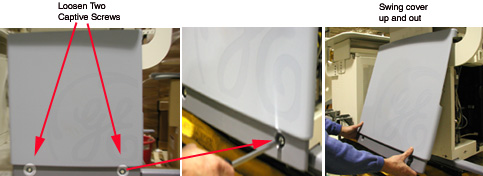
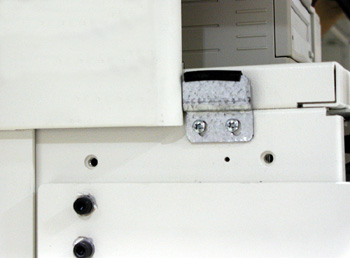
1.2 Installation Procedure
Procedure
- Engage side cover on cover hangers.
- Swing cover into position.
- Tighten the two captive screws at the bottom of the side cover.
2 Front Cover
2.1 Removal Procedure
Procedure
- From the service desktop, shut down the system.
- Turn off console power.
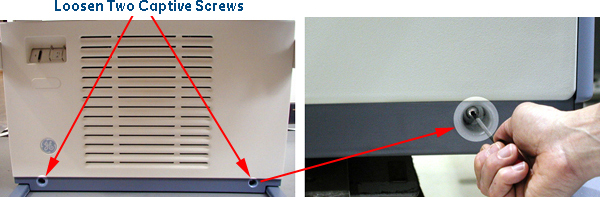
- Loosen two captive screws at bottom of console. See Figure 3.
Figure 3. Front Cover Removal - Global Consoles
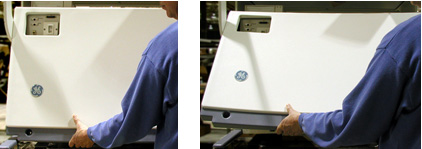
- Rotate bottom of cover outward and upward until it may be lifted free of the console at the top.
2.2 Installation Procedure
Procedure
- Engage top of cover with top front of console.
- Swing cover down into place.
- Tighten two captive screws at bottom of console.
3 Rear Cover
Procedure
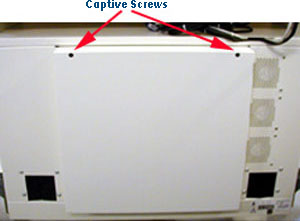
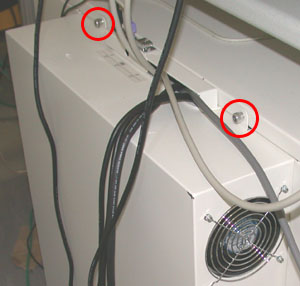
- Loosen two captive screws at top of rear cover.
- Tilt cover backward, so top moves away from console.
- Lift cover away, so that tabs disengage from bottom lip of opening.
- To reinstall, reverse the previous steps.
4 Finalization
No finalization steps.