- Topic ID: id_15460259
- Version: 3.0
- Date: Jun 15, 2020 10:55:15 PM
Ball Bearing Tube Restoration Procedure for VCT
Prerequisites
Overview
This procedure explain the steps required to replace a Tube Performix VCT Plus (LB) Tube with a Performix Pro-VCT (BB). The software 12HW14.6_SP2-2-X, 16HW36.x_SP1-0-X or 13HW31.x_SP2-0-X can be used on both of Performix Pro-VCT Tube and Performix VCT Plus Tube, therefore, no software load is required.
Figure 1. Flowchart - Restoration of Performix Pro VCT 100 Tube (Ball Bearing)
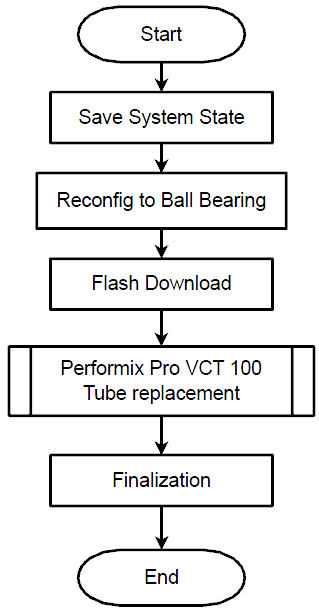
Procedure
- Perform Save System State
- Using CSD > Utilities > System State.
- Insert DVD or USB memory and press “Save System State”.
- Go to reconfig. menu and set Bearing type of X-ray Tube to “Ball”. Refer to System Configuration (12HW14.6 SP2.1 or later).
- Perform Flash Download.
- Using CSD > Utilities > Flash Download.
- Press “Update”.
- Once the Gantry Hardware Flash Downloads successfully, select [Dismiss].
- Interposer plate must be replaced with original one during Tube replacement procedure. Refer to Upgrade procedure for details.
- Install Performix Pro-VCT Tube. Refer to the Tube Replacement .
Finalization
- Perform sanity scan with the following technique and confirm
they completed successfully.
Scout, Axial and Helical.
- Remove the Service Switch Panel Notice Label on gantry service switch panel.