- Topic ID: id_15460648
- Version: 2.0
- Date: Nov 8, 2018 1:36:22 AM
Autovoice/Intercom Checks
Prerequisites
Figure 1. SCIM Volume Controls
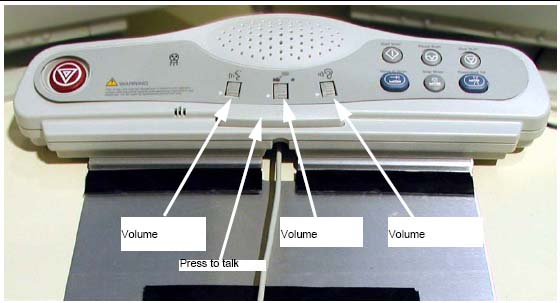
1 Patient Speaker
To adjust the volume of the patient speaker in the table:
Procedure
- Adjust the left-most volume thumb wheel on the SCIM while speaking into the console microphone. (Press the bar on the SCIM to talk; release the bar to listen.)
- The assistant should be able to clearly hear the operator.
2 Operator Console Speaker
To adjust the console speaker volume:
Procedure
- Have an assistant speak into the gantry microphone.
- Adjust the SCIM console volume knob until you can clearly hear the assistant.
3 Autovoice Volume
Procedure
- On the Scan Desktop, select PROTOCOL MANAGEMENT.
- Select AUTO VOICE RECORD.
- Click the 3.4 button, to the right of FF2. Inspiration.
- Click the PLAY button, to play the Inspiration AutoVoice message.
- Adjust the center volume thumb wheel while Autovoice is playing, to set the volume for the gantry speaker.
- Repeat steps 4 and 5 as necessary to achieve satisfactory volume.
- Select DONE, then select QUIT.note:
If a satisfactory volume cannot be achieved, refer to the system service manual and review the intercom module setup procedure.
4 Finalization
No finalization steps.