|
1. Drive the QA phantom into the gantry opening until
the line on the phantom is in line with both internal axial laser
lights.
|
|
|
2. If not already done, center the phantom in the scan
plane using CENTER PHANTOM in the Scanner Utilities.
|
|
3. Select NEW PATIENT and select
the service protocol, MANUFACTURING, TOMO PLANE INDICATION.
|
|
4. Use the single image format view to execute the Image
1 Series exam from IMAGE WORKS.
|
|
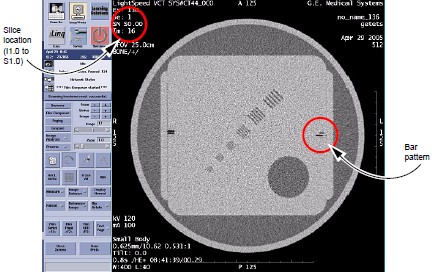
5. Locate the scan plane indicator, the longest bar in
the bar pattern on the right side of the phantom. Record the scan
location of the scan plane indicator on the GE Form e4879 Installation
Data Verification.
|
|
6. The scan plane deviation should equal S0.0 +/- 1.0mm.
If necessary, adjust the internal alignment light position to meet
this requirement.
|
|
7. Repeat the Tomographic Plane Indication test with
the external alignment lights.
|