- Topic ID: id_15460318
- Version: 3.0
- Date: Sep 30, 2019 9:33:12 PM
NGPDU Checks
1 NGPDU Checks
 |
|

|
|
-
Vacuum any dust found on the covers and inside the NGPDU.
-
Visually inspect the NGPDU electronic components for discoloration and arcing damage.
-
Torque the main power connectors (for torque values, see Table 1).
-
Torque the main ground lug connection (for torque values, see Table 2)
-
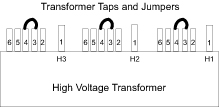
Based on voltage reading taken previously, determine the nearest nominal line and verify that the tap connections match. (For tap locations and connections, see Figure 1). (For detailed instructions, refer to “Initial PDU Configuration” in Book 1 of the Installation Manual.)
Figure 1. Tap Locations
-
Re-tap the transformer, if required.
-
Reinstall the NGPDU front and top covers.
2 Seismic Anchor Bolt Checks
-
Not every system has seismic anchors. If your system does, check to see if you can move the anchor washer by hand.
-
If moveable, follow the procedures in the state-issued seismic installation directions for your site, to inspect the anchors and re-torque them if necessary.
note:Due to variances in local ordinances and mounting hardware, torque values may vary.